
Document Insertion Unit-R
If the "Document Insertion Unit-R" is attached to the "Staple Finisher-AF" or "Booklet Finisher-AF," you can use paper different than the main document pages for a cover or sheet insertion.
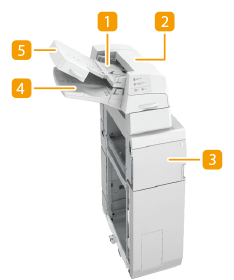
 Upper tray
You can load paper you want to use as a cover, sheet insertion, or job separator, etc. Loading Paper into the Document Insertion Unit-R
 Upper cover
Open to remove jammed paper. Paper Jams in the Document Insertion Unit-R
 Front cover
Open to remove jammed paper. Paper Jams in the Document Insertion Unit-R
 Lower tray
You can load paper you want to use as a cover, sheet insertion, or job separator, etc. Loading Paper into the Document Insertion Unit-R
 Tray cover
Lift to load paper in the lower tray. Loading Paper into the Document Insertion Unit-R
Loading Paper into the Document Insertion Unit-R
|
For information on basis weight and paper size that can be used, see items for the "Document Insertion Unit-R" in Available Paper. If you are loading preprinted paper to use as the cover page into the document insertion unit, you must load the paper face up. |
1
Adjust the slide guides to fit the paper size.
 To load paper in the upper tray:
1 | Adjust the slide guide. 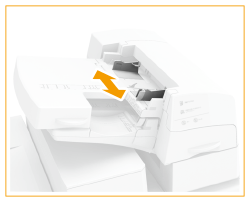 |
To load paper in the lower tray:
1 | Open the tray cover. 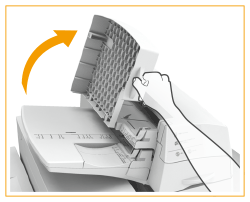 |
2 | Adjust the slide guide. 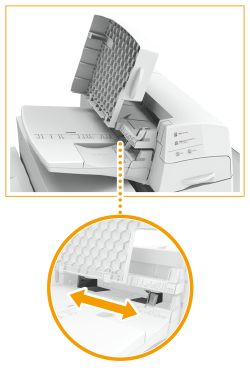 |
2
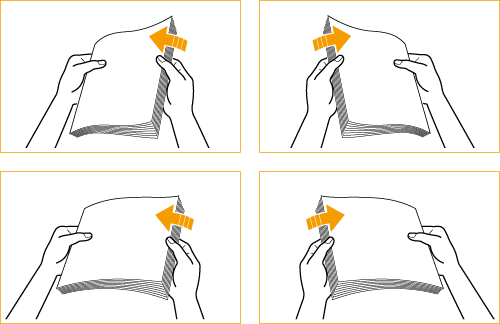
Prepare the paper to load.
Fan the sheets several times and align the edges to facilitate feeding.
3
Load the paper stack into the "Document Insertion Unit-R."
If you want to load paper into the upper tray:
1 | Load the paper face up. 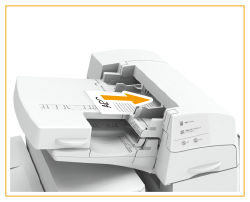 |
If you want to load paper into the lower tray:
1 | Load the paper face up. 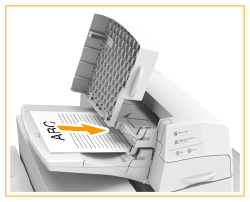 |
2 | Close the tray cover.  When you load tab paper, load it in reverse tab order and face down with the tabs on the opposite side of the feeding direction. 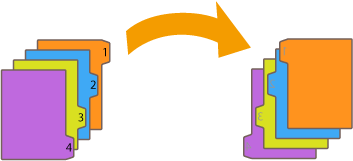 |
4
Select the paper size and press <Next>.
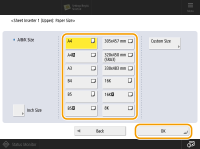
Select the same paper size that is loaded in the "Document Insertion Unit-R."
5
Select the paper type and press <OK>.
 |
Make sure that the height of the paper stack does not exceed the loading limit mark (  ). ). |
|
You cannot make prints on paper that is loaded in the "Document Insertion Unit-R." If the automatic switch for the insertion unit is set to 'On', when the selected tray of the insertion unit runs out of paper during print job, the machine automatically selects another tray of the insertion unit and continues printing. |