Importing/Exporting the Settings Individually
You can select particular settings to import or export, such as address lists in the Address Book, or printer settings. Administrator privileges are required in order to perform these operations.
Exporting Settings Individually
1
Start the Remote UI. Starting the Remote UI
2
Click [Settings/Registration] on the portal page. Remote UI Screen
3
Click [Data Management], and select the settings to export.
 When exporting Web Access favorites
1 | Click [Web Access Favorites] in [Import/Export Individually]. |
2 | Click [Export...]. |
When exporting printer settings
1 | Click [Printer Settings] in [Import/Export Individually]. |
2 | Click [Export...]. |
When exporting paper information
1 | Click [Paper Information] in [Import/Export Individually]. |
2 | Click [Export...]. |
3 | Select the paper setting information in [Category]. |
4
Click [Start Exporting].
5
Follow the on-screen instructions to specify where to save the data.
Importing Settings Individually
1
Start the Remote UI. Starting the Remote UI
2
Click [Settings/Registration] on the portal page. Remote UI Screen
3
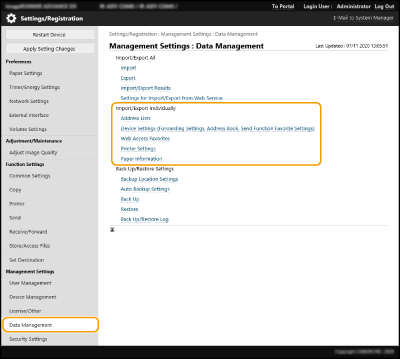
Click [Data Management], and select the settings to import.
 }}
}}When importing Web Access favorites
1 | Click [Web Access Favorites] in [Import/Export Individually]. |
2 | Click [Import...]. |
3 | Click [Browse...], and specify the setting data to import. Only 20 favorites are imported in the order that they were registered, starting from the top. |
When importing printer settings
1 | Click [Printer Settings] in [Import/Export Individually]. |
2 | Click [Import...]. |
3 | Click [Browse...], and specify the setting data to import. |
When importing paper information
1 | Click [Paper Information] in [Import/Export Individually]. |
2 | Click [Import...]. |
3 | Configure the necessary settings. 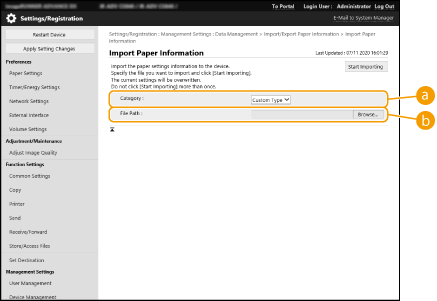  [Category] [Category]Select the paper setting information.  [File Path] [File Path]Click [Browse...], and specify the file to import. |
4
Click [Start Importing]  [OK].
[OK].
[OK].The machine may need to be restarted depending on the settings to import. Restarting the Machine