
Document Insertion Unit-R
If the "Document Insertion Unit-R" is attached to the "Staple Finisher-AG" or "Booklet Finisher-AG," you can use paper different than the main document pages for a cover or sheet insertion.
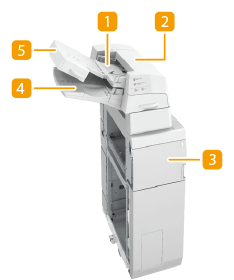
 Upper tray
You can load paper you want to use as a cover, sheet insertion, or job separator, etc. Loading Paper into the Document Insertion Unit-R
 Upper cover
Open to remove jammed paper. Paper Jams in the Document Insertion Unit-R
 Front cover
Open to remove jammed paper. Paper Jams in the Document Insertion Unit-R
 Lower tray
You can load paper you want to use as a cover, sheet insertion, or job separator, etc. Loading Paper into the Document Insertion Unit-R
 Tray cover
Lift to load paper in the lower tray. Loading Paper into the Document Insertion Unit-R
Loading Paper into the Document Insertion Unit-R
|
For information on basis weight and paper size that can be used, see items for the "Document Insertion Unit-R" in Available Paper. If you are loading preprinted paper to use as the cover page into the document insertion unit, you must load the paper face up. |
1
Adjust the slide guides to fit the paper size.
 To load paper in the upper tray:
1 | Adjust the slide guide. 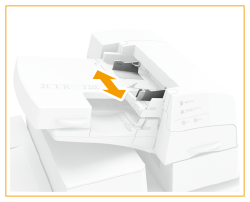 |
To load paper in the lower tray:
1 | Open the tray cover. 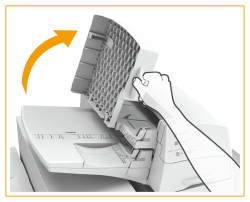 |
2 | Adjust the slide guide. 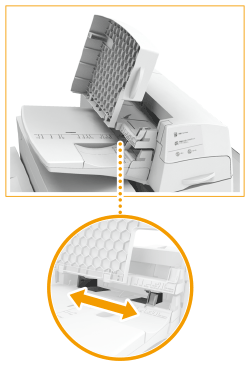 |
2
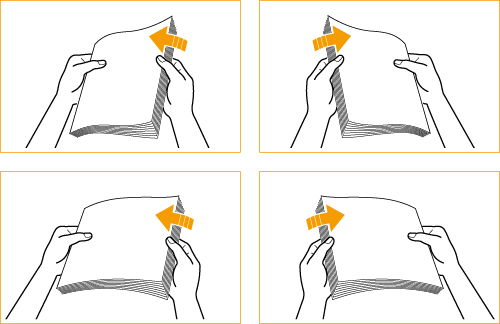
Prepare the paper to load.
Fan the sheets several times and align the edges to facilitate feeding.
3
Load the paper stack into the "Document Insertion Unit-R."
If you want to load paper into the upper tray:
1 | Load the paper face up. 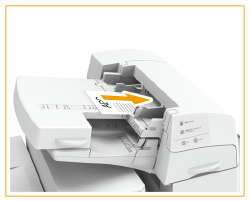 |
If you want to load paper into the lower tray:
1 | Load the paper face up. 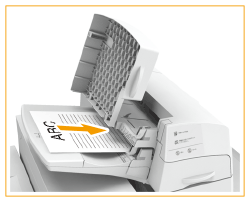 |
2 | Close the tray cover.  When you load tab paper, load it in reverse tab order and face down with the tabs on the opposite side of the feeding direction. 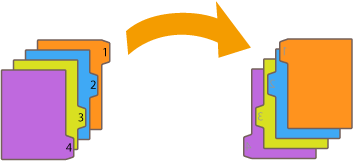 |
4
Select the paper size and press <Next>.
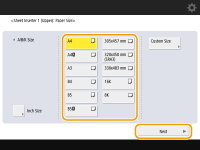
Select the same paper size that is loaded in the "Document Insertion Unit-R."
5
Select the paper type and press <OK>.
 |
Make sure that the height of the paper stack does not exceed the loading limit mark (  ). ). |
|
You cannot make copies or print on paper that is loaded in the "Document Insertion Unit-R." If the automatic switch for the insertion unit is set to 'On', when the selected tray of the insertion unit runs out of paper during copy/print job, the machine automatically selects another tray of the insertion unit and continues copying/printing. |