
Configuring the Department ID Management Settings
You can organize and manage users in groups based on Department ID. Follow the procedure below to configure Department ID Management and enable the machine to count the number of pages used for printing.
|
Make sure that Department IDs have been set for the users registered in the machine. Registering User Information in the Local Device Department ID Management is only valid for users who are registered to the local device. If you login as a user with Administrator privileges, a System Manager ID and PIN are automatically assigned, and managed as Department ID. |
 |
For information on the number of Department IDs that you can register, see Management Functions. |
Enabling Department ID Management
1
Start the Remote UI. Starting the Remote UI
2
Click [Settings/Registration] on the portal page. Remote UI Screen
3
Click [User Management]  [Department ID Management].
[Department ID Management].4
Click [Edit].
5
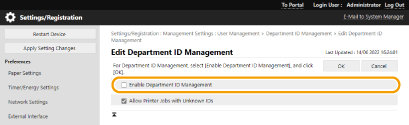
Select [Enable Department ID Management].
6
Click [OK].
Registering Department IDs and PINs
1
Start the Remote UI. Starting the Remote UI
2
Click [Settings/Registration] on the portal page. Remote UI Screen
3
Click [User Management] [Department ID Management].
[Department ID Management].4
Click [Register New Department].

To edit Department ID settings
Click the department ID to edit to display the edit screen.
To delete Department ID settings
Click [Delete] for the department ID to delete [OK].
[OK].5
Enter the required information, and click [OK].
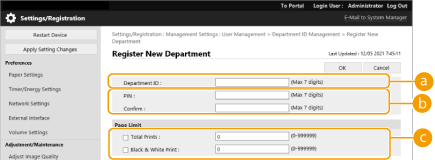
 [Department ID]
Enter a number of 7 digits or less for the Department ID.
 [PIN]
[PIN]Enter the PIN (seven digits maximum). Enter the PIN again in [Confirm]. If you do not want to set a PIN, leave it blank.
 [Page Limit]
You can restrict the number of pages that a registered department can print. Select the target types and enter the page totals.
You cannot register a Department ID or PIN consisting only of 0s, such as "00" or "0000000".
Even if you enter fewer than seven digits, zeros are added to the start of the number, and a seven digit number is set.
You can also make entering seven digits a requirement for Department IDs and PINs. For more information, contact your dealer or service representative.
|
To check the page countsIf you want to check the total number of pages used by each Department ID for printing, check [Department ID Page Totals] on the screen displayed in step 4. The page counts do not include blank pages or sample prints used for checking items such as gradation adjustment. Logging In Using a Department ID and PINBy registering a user with the same name as a department ID, login operations can be performed using a registered department ID and PIN. Registering User Information in the Local Device |