Cleaning the Exterior
Periodically wipe the surface of the machine to keep it clean.
1
Turn the power OFF, and remove the power plug from the power outlet.

Check the operation status of the machine before turning the power OFF. You can turn the power OFF even if the machine is executing an operation, but this may cause the operation to be interrupted or data to become damaged.
2
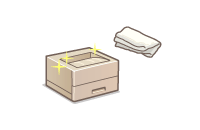
Clean the exterior of the machine and the ventilation slots.
Wet a soft cloth with water or diluted mild detergent, wring the cloth out well, and wipe the machine.
To locate the ventilation slots, see Back Side
Wait until the moisture has completely dried before proceeding to the next step.
3
Insert the power plug into the power outlet, and turn the power ON.