
Relocating the Machine
The machine is heavy. Make sure to follow the procedures below to avoid injury when moving the machine. Also, to confirm the safety precautions before you begin to move, read the Important Safety Instructions included with the machine.
|
If the machine is to be transported for relocation, removals, etc., take the following steps to prevent damage and faults during transportation: Remove the toner cartridges. Securely pack the machine in the original packaging (box) and packing materials. |
1
When transporting the machine over a long distance, perform <Clean to Prevent Toner Leaking>.
1 | Select <Set>  <Adjustment/Maintenance> <Maintenance> <Clean to Prevent Toner Leaking>. <Adjustment/Maintenance> <Maintenance> <Clean to Prevent Toner Leaking>. |
2 | Press  . .Cleaning starts. You cannot cancel cleaning after it starts. Wait until the operation is complete. |
2
Turn OFF the machine and computer.

Check the operation status of the machine before turning the power OFF. You can turn the power OFF even if the machine is executing an operation, but this may cause the operation to be interrupted or data to become damaged.
3
Disconnect the cables and cord from the machine in numerical order as in the illustration below.
Whether the cables with "*" are connected depends on your environment.
 Power plug Power plug Power cord Power cord LAN cable* LAN cable* USB cable* USB cable* USB device* USB device* | 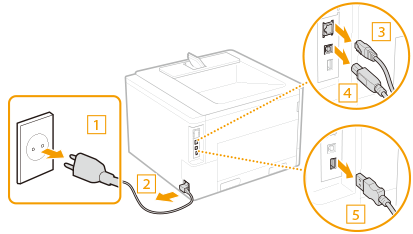 |
4
When transporting the machine across a long distance, remove the toner cartridge and drum cartridge.
5
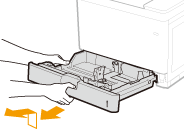
Pull out the paper drawer until it stops, and remove it while lifting the front side.
6
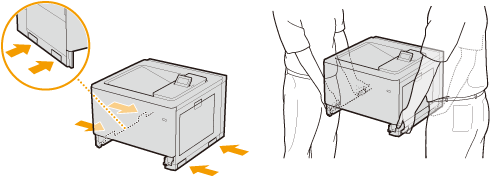
Close all the open covers, and move the machine to a new location.
The machine is heavy (Hardware Specifications). Do not try hard to carry the machine.
Use the handles on both sides of the machine, and have at least two people carry it.
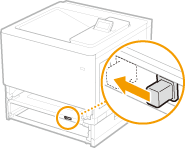
If the optional paper feeder or the cassette feeding unit is attached to the machine.
Unlock the paper feeder or the cassette feeding unit before lifting the machine, and transport the paper feeder or the cassette feeding unit separately.
7
Carefully place the machine at the new installation site.
For information about how to install the machine after relocating it, see Setup Guide. Manuals and Their Contents