
Replacing the Drum Cartridges
A message is displayed when a drum cartridge is nearing the end of its life. Follow the instructions in the message to prepare and install a new drum cartridge.
Cautions When Replacing the Drum Cartridges
|
Be sure to hold the drum cartridge using the handle. 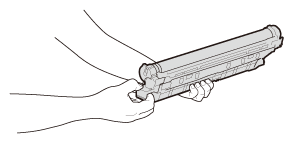 Avoid scratching the drum surface (  ) or exposing it to light. Do not touch the electrical contacts ( ) or exposing it to light. Do not touch the electrical contacts ( ) or the drum cartridge memory ( ) or the drum cartridge memory ( ). ).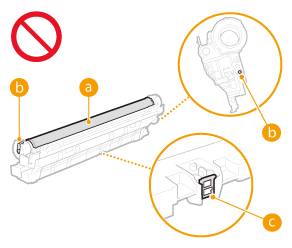 Except when necessary, do not take out the drum cartridge from the packing material or from this machine. |
 |
For details about each message, see Countermeasures for Each Message. For information on the product numbers for drum cartridges, see Consumables. You can check the current amount of toner remaining. Checking the Remaining Amount of Consumables |
Procedure for Replacing the Drum Cartridges
1
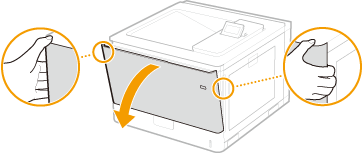
Fully open the front cover.
2
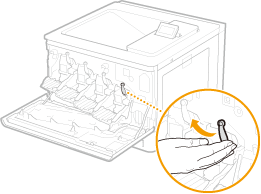
Unlock the drum cartridge lever.
3
Pull out the drum cartridge.
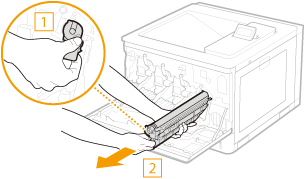

Before pulling out the drum cartridge, confirm that the left cover has been opened all the way. The drum cartridge may be damaged if it is pulled out with the front cover not open all the way.
Make sure to hold the drum cartridge with both hands and gently pull it out horizontally. Pulling the drum cartridge out quickly may damage the drum cartridge.
4
Remove the replacement drum cartridge from the packing materials.

5
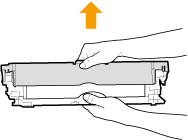
Remove the protective cover.
6
Install the drum cartridge.
Align the drum cartridge with the drum cartridge guide () and push it into the slot until it stops.
) and push it into the slot until it stops.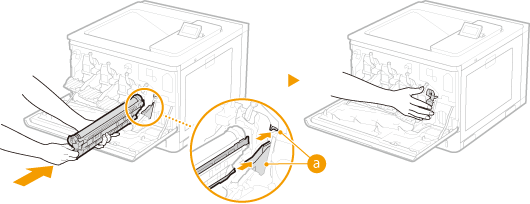
Before pulling out the drum cartridge, confirm that the left cover has been opened all the way. The drum cartridge may be damaged if it is pulled out with the front cover not open all the way.
Be careful that you do not touch the drum surface () or hit it against the mouth of the slot. Scratching the drum surface () may result in a failure.
) or hit it against the mouth of the slot. Scratching the drum surface () may result in a failure.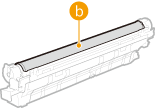
Make sure to hold the drum cartridge with both hands and gently pull it out horizontally. Pulling the drum cartridge out quickly may damage the drum cartridge.
Drum cartridges that were used or are being used for a specific color must not be reused for a different color. Such reuse of drum cartridges may result in poor print quality.
7
Lock the drum cartridge lever.
8
Close the front cover.