
Replacing the Waste Toner Container
When the waste toner container is almost full or completely full, a message is displayed prompting you to prepare a new waste toner container or perform waste toner container replacement. Prepare a new waste toner container or perform waste toner container replacement according to the displayed message.
Cautions When Replacing the Waste Toner Container
|
Do not replace the waste toner container before the message prompting you to replace it appears on the display. Do not tilt the waste toner container because doing so may cause toner to spill out of the mouth of the container (  ). ).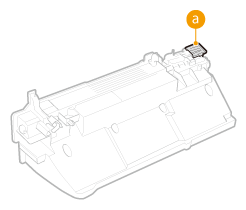 |
 |
The waste toner container is a container for collecting unused toner that remains when printing. For details about each message, see Countermeasures for Each Message. For information on the model number of the waste toner container, see Consumables. You can check the current amount of space remaining in the waste toner container. Checking the Remaining Amount of Consumables |
Procedure for Replacing the Waste Toner Container
When replacing the waste toner container, the procedure is also displayed on the screen. Check the information displayed on the screen in addition to the following procedure.
1
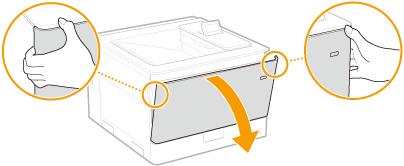
Open the front cover.
2
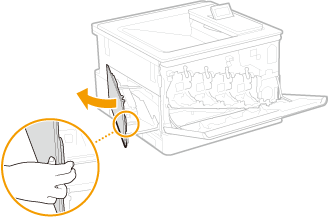
Open the left cover.
3
Remove the waste toner container.
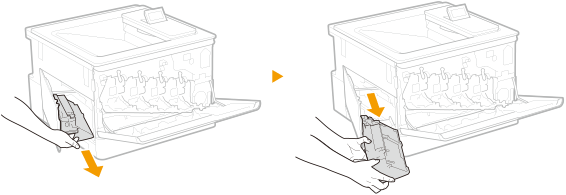

The waste toner container may be heavy because of the accumulated toner.
Be careful not to tilt the container. Tilting the waste toner container will result in spilling of collected toner.
Place the waste toner container into a plastic bag to prevent toner in the container from spilling.
4
Remove the waste toner container from the packing materials.
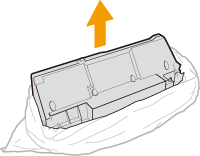
Do not disassemble or modify the waste toner container.
5
Install the new waste toner container and close the left cover.
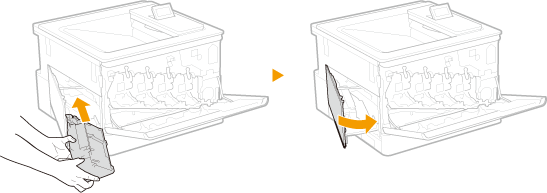
Insert it while aligning it with the left cover and the lower tray.
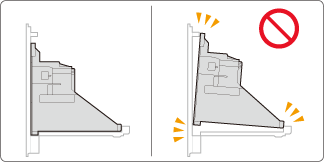
6
Close the front cover.
|
The message prompting you to prepare a new waste toner container may still be displayed after replacing the waste toner container. Cancel the message by performing regular printing or following the procedure below to open and close the left cover.  Opening and closing the left cover Opening and closing the left cover1 Open the front cover, then the left cover. 2 Close the left cover, then the front cover. |