
Configuring System Data Communication
The settings described in this section are required to use the sub line for performing DNS name resolution and data communication via a proxy. Administrator or NetworkAdmin privileges are required to specify these settings.
|
The DNS server address setting and proxy settings for the sub line can only be used for specific system data communication. They cannot be used for a regular internet connection. When using a DNS server or proxy server for the sub line for applications other than system data communication, register the addresses and port numbers to use with the sub line in the settings of the main line. You can also perform certain types of system data communication with the main line. |
Setting the DNS of the Sub Line
1
Press  (Settings/Register).
(Settings/Register).2
Press <Preferences>  <Network> <Sub Line Settings> <Settings for System Data Communication> <DNS Server Address Settings>.
<Network> <Sub Line Settings> <Settings for System Data Communication> <DNS Server Address Settings>.3
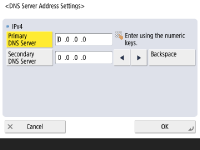
Specify the required settings.
Enter the IP address of the DNS server, according to your environment.
4
Press <OK>.
5
Press (Settings/Register) <Yes>.
(Settings/Register) <Yes>.Proxy Settings of the Sub Line
1
Press (Settings/Register).
(Settings/Register).2
Press <Preferences> <Network> <Sub Line Settings> <Settings for System Data Communication> <Proxy Settings>.
<Network> <Sub Line Settings> <Settings for System Data Communication> <Proxy Settings>.3
Press <On> for <Use Proxy> configure the required settings press <OK>.
configure the required settings press <OK>.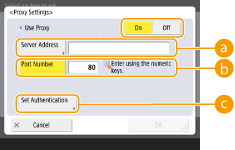
 <Server Address>
Enter the address of the proxy server to use. Specify the settings, such as the IP address and host name, according to your environment.
 <Port Number>
Enter the port number of the proxy server.
 <Set Authentication>
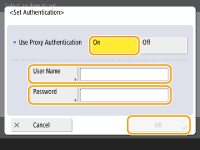
Press this to set the authentication information when using the authentication function of a proxy server. Press <On> on the displayed screen, enter the user name and password for proxy authentication, and press <OK>.
4
Press (Settings/Register) <Yes>.
(Settings/Register) <Yes>.Selecting the line to use
1
Press (Settings/Register).
(Settings/Register).2
Press <Preferences> <Network> <Sub Line Settings> <Settings for System Data Communication> <Select Line to Use>.
<Network> <Sub Line Settings> <Settings for System Data Communication> <Select Line to Use>.3
Select <Main Line> or <Sub Line> press <OK>.
press <OK>. |
If you select <Main Line> for <Select Line to Use>, the settings for <Main Line> are reflected in <DNS Server Address Settings> and <Proxy Settings>. |