
Replacing the Drum Unit
Replace the drum unit at the appropriate time according to the displayed message. Manuals of the Machine
|
Do not remove the orange-colored protective cover until you are instructed to do so in the following procedure. |
 |
For the model number of the drum unit, see List of Consumables. |
When to Replacing the Drum Unit
When a Message Appears on the Screen of the Control Panel or Remote UI
Follow the message on the screen to prepare a new drum unit and replace the old one.
For details about the message and how to resolve it, see the following:
A Message Appears
For details about the message and how to resolve it, see the following:
A Message Appears
|
The drum unit replacement message displayed on the screen differs depending on your contract. |
Replacing the Drum Unit
1
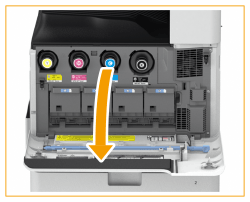
Open the front cover of the main unit.
2
Open the cover of the drum unit.

3
Pull out the drum unit.

Pull out the drum unit while supporting it with your hands as indicated in the diagram.
Do not tilt the drum unit. Doing so may cause the toner in the drum to spill.
4
Remove the new drum unit from its box.

5
Install the new drum unit.

6
Remove the protective cover.
First push in the slider on the right side of the orange-colored protective cover toward the back of the main unit until it cannot go any further, and then pull out the protective cover.

After removing the protective cover, check that the drum unit is pushed fully into the main unit. Failing to push the drum unit in fully will cause a malfunction.

7
Close the cover of the drum unit.
8
Close the front cover of the main unit.
|
After the replacement is complete, put the used drum unit in the bag that contained the new drum unit, and store it until your dealer or service representative comes to collect it. |