Installation Location
Selecting and Configuring an Installation Location
Installation Location
Avoid installing the machine in the following locations.
Locations where a considerable amount of dust accumulates.
Locations near volatile or flammable materials, such as alcohol or paint thinner.
Locations where the machine is exposed to rapid changes in temperature.
If the room in which the machine is installed is cold but rapidly heated, water droplets (condensation) may form inside the machine. This may result in a noticeable degradation in the quality of the copied image, the inability to properly scan an original, or the copies having no printed image at all.
Locations near computers or other precision electronic equipment.
Electrical interference and vibrations generated by the machine during printing can adversely affect the operation of such equipment.
Locations near televisions, radios, or similar electronic equipment.
The machine might interfere with sound and picture signal reception. Insert the power plug into a dedicated power outlet, and maintain as much space as possible between the machine and other electronic equipment.
Locations near ultrasonic humidifiers or sprinkler humidifiers.
Be careful with the installation layout and operating environment when installing the machine in the following locations.
Locations near equipment (*) which releases volatile substances.
Volatile substances may get inside the machine and affect the image quality.
If you are using such equipment, consult your local authorized Canon dealer or service representative before use.
If you are using such equipment, consult your local authorized Canon dealer or service representative before use.
*Example: equipment which uses hot melt adhesives (bookbinding machines or laminators), aroma equipment, diazo copying machines etc.
Installing multiple machines
If you install multiple machines nearby, consult your local authorized Canon dealer or service representative about the installation layout before the installation so that the air intake section of a machine does not approach the exhaust section of other machines.
Do not remove the leveling feet.
Do not remove the leveling feet after the machine has been installed.
If you put weight on the front of the machine while the drawers, paper decks, or units within the machine are pulled out, the machine may fall forward. To prevent this from happening, make sure that the leveling feet are in place.
If you put weight on the front of the machine while the drawers, paper decks, or units within the machine are pulled out, the machine may fall forward. To prevent this from happening, make sure that the leveling feet are in place.
Direct Sunlight
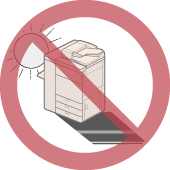
Avoid installing the machine in direct sunlight.
If this is unavoidable, use curtains to shade the machine. Be sure that the curtains do not block the machine's ventilation slots or louvers, or interfere with the electrical cord or power supply.
If this is unavoidable, use curtains to shade the machine. Be sure that the curtains do not block the machine's ventilation slots or louvers, or interfere with the electrical cord or power supply.
Lighting
We recommend installing the machine in a location with at least 500 lux (75 cm above the floor) for normal operation and maintenance.
Delivery Pathway
For information on the size and weights of the imageRUNNER ADVANCE DX 8905 / 8995 / 8986 and its options, see Sizes, Weights, and Required Corridor Width for Turning Each Device. Confirm that there is enough moving space and required floor strength to deliver the machine.
Floor Structure
Floor Structure
The floor on which this machine will be installed must have a floor load of at least 300 kg/m2. Even if the floor does not have this level of floor load, the machine can be installed near a pillar or beam. Consult with your building contractor before installing the machine.
The weight of the machine will be primarily focused on the floor through the adjuster and wheels. We recommend the use of a mat to distribute the weight.
We also recommend the use of a mat when installing the machine on carpet or wood flooring. For information about mats, contact your dealer.
Do not install the machine on an unstable floor or platform.
The weight of the machine will be primarily focused on the floor through the adjuster and wheels. We recommend the use of a mat to distribute the weight.
We also recommend the use of a mat when installing the machine on carpet or wood flooring. For information about mats, contact your dealer.
Do not install the machine on an unstable floor or platform.
Standard Values of Floor Structure
Be sure to install the imageRUNNER ADVANCE DX 8905 / 8995 / 8986 and optional equipment on the floor which satisfies the following standard.
Floor Stiffness | The amount of sinking in the floor must be 4 mm or less, if the load of 600 kg/m2 is applied to it. If this is not satisfied, use the floor plates partially. * Use the floor plates if the machine is installed on the mat, wooden floor, or rubber floor. * Depending on the amount of sinking in the floor, stack the floor plates to reduce the inequality of height of the joints. |
Floor Flatness | The flatness in arbitrary rectangular area 1,100 mm x 530 mm must be 4 mm or less. |
Floor Vertical Interval | The vertical interval between arbitrary two points of 1,000 mm interval must be 3 mm or less. (The amount of sinking in the floor is not included.) |
Floor Inclination | The inclination between arbitrary two points of 1,600 mm interval must be 3 mm or less. |
Measuring Methods for Each Standard Value
The standard values are measured according to the following procedures.
Use the iron plate as a floor plate, which corresponds to 890 mm x 487.5 mm in size, 13 kg in weight, and 4 mm in thickness.
Use the iron plate as a floor plate, which corresponds to 890 mm x 487.5 mm in size, 13 kg in weight, and 4 mm in thickness.
Floor Withstand Load | Confirm the specifications of the floor withstand load to the contractor of the building where the machine is scheduled to be installed. | ||
Floor Stiffness | Prepare one floor plate and put it on the place where the machine is scheduled to be installed. Measure the amount of sinking in the floor when two adults (approximately 150 kg) step onto the plate. From this measurements, estimate the amount of sinking in the floor when the machine is installed by doing proportional calculation. 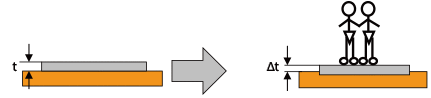 Calculation MethodEach parameter is specified as follows: t: the height from the floor to the upper surface of the floor plate Δt: the height from the floor to the upper surface of the floor plate when the load is applied Ts (mm/kgf): the constant of the estimated amount of sinking in the floor Ts (ME): the amount of sinking in the floor where this machine is installed First of all, calculate the constant of the estimated amount of sinking in the floor. Ts (mm/kgf) = (t - Δt)/150 Using this constant, estimate the amount of sinking in the floor where this machine is installed. Ts (ME) = (214 (kgf)/2) x Ts (mm/kgf) ExampleIn the case of t = 4 mm Δt = 3 mm The constant of estimated amount of sinking in the floor is calculated as shown below. (4 - 3)/150 = 0.006 In this example, the estimated amount of sinking in the floor where this machine is installed is 0.642 mm with the following formula. Ts (ME) = (214 (kgf)/2) x 0.006 = 0.642
| ||
Floor Flatness | Put one floor plate on the floor where the machine is scheduled to be installed, and put the simplified level on the center of it. To make the floor plate horizontal, insert some spacers (coins) under A or B of the floor plate, as shown in the illustration below. Calculate the floor flatness from the spacer's thickness and the number of them. 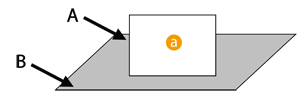  : Simplified Level : Simplified LevelCalculation MethodUse coins which have same thickness as a spacer. Each parameter is specified as follows: t (mm): the thickness of the spacer a: the number of the spacers inserted under A b: the number of the spacers inserted under B When a > b, the floor flatness is calculated by the following formula. t x a (mm) ExampleThe coins of 1 mm in thickness are used as a spacer. If two spacers are inserted under A, and nothing is inserted under B to make the floor plate horizontal, the floor flatness is 2 mm. | ||
Floor Vertical Interval (This method is used when there is a step in the floor.) | Arrange two floor plates next to each other and put them on the floor where the machine is scheduled to be installed. According to the measuring method of the "Floor Flatness", set one floor plate horizontally. And then, set another one horizontally in the same way. Measure the difference of height between two floor plates.
| ||
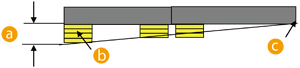
Floor Inclination (This method is used when the floor inclines gently.) | Arrange two floor plates next to each other and put them on the floor where the machine is scheduled to be installed. According to the measuring method of the "Floor Flatness", set one floor plate horizontally. And then, insert the spacers (coins) under another floor plate to set plate horizontally with its height same as the one that you have set first. In this case, insert the spacers at the arbitrary position of the floor plate edge. Measure the floor inclination with the thickness of the spacers that are located most away from the reference point (the point determined as a bench mark of the height). (See the illustration below.)
Calculation MethodUse coins which have same thickness as a spacer. Each parameter is specified as follows. t (mm): the thickness of the spacer a: the number of the spacers The floor flatness is calculated by the following formula. S = t x a (mm) ExampleThe coins of 1 mm in thickness are used as a spacer. If three spacers are inserted under the position that is most away from the reference point, the floor inclination is 3 mm (= 1 mm x 3). |


Installation Space
Necessary Installation Space
Provide enough space on each side of the machine for unrestricted operation.
Also, the space of 5 mm between each equipment is necessary to connect them.
Standard (minimum) configuration
When the Copy Tray-R is attached:
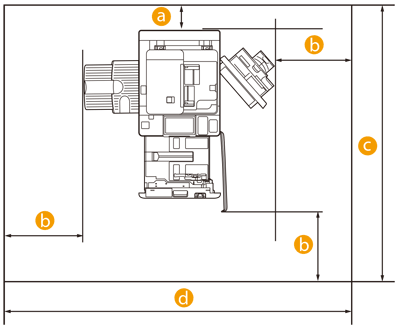 : 100 mm or more
 : 500 mm or more
 : 1,953 mm or more
 : 2,533 mm or more
Space Required on the Rear
Make sure to install the machine at least 100 mm away from the wall surface so that operations on the rear of the machine are not hindered.
Ensure the following space, according to the option configuration of the machine.
When any one of the output/feeding options indicated in "Full option (maximum) configuration" is attached: 800 mm or more
Space Required on the Front and Left/Right
Make sure to install the machine at least 500 mm away from the wall surface to ensure space for service operations
Ensure the following space, according to the option configuration of the machine.
When any one of the output/feeding options indicated in "Full option (maximum) configuration" is attached: 1,000 mm or more
Full option (maximum) configuration
For the following device configurations
POD Deck Lite-C
Document Insertion Unit-R
Multi Function Professional Puncher-C
Paper Folding Unit-K
Booklet Finisher-AG
Booklet Trimmer-G
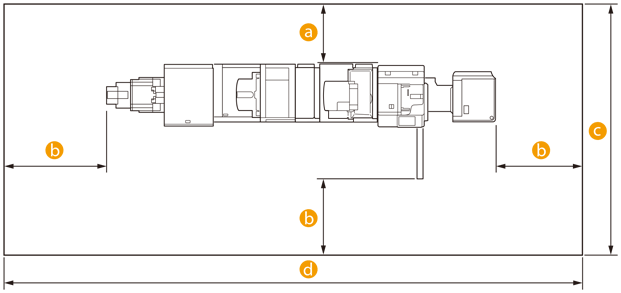 : 800 mm or more : 1,000 mm or more : 3,247 mm or more : 7,068 mm or more
Space Required on the Rear
Make sure to install the machine at least 800 mm away from the wall surface so that operations on the rear of the machine are not hindered.
Ensure the following space, according to the option configuration of the machine.
When none of the output/feeding options indicated in "Full option (maximum) configuration" are attached: 500 mm or more
Space Required on the Front and Left/Right
Make sure to install the machine at least 1,000 mm away from the wall surface to ensure space for service operations.
Ensure the following space, according to the option configuration of the machine.
When none of the output/feeding options indicated in "Full option (maximum) configuration" are attached: 500 mm or more
Sizes, Weights, and Required Corridor Width for Turning Each Device
Product Name | Dimensions (W x D x H) | Weight | Corridor Width Required for Rotation*1 |
imageRUNNER ADVANCE DX 8905 / 8995 / 8986 | 670 mm x 770 mm x 1,185 mm | Approx. 214 kg (Including the toner cartridge) | 1,527 mm |
POD Deck Lite-C | 656 mm x 686 mm x 578 mm | Approx. 68 kg | 1,450 mm |
Paper Deck Unit-E | 363 mm x 630 mm x 582 mm | Approx. 34 kg | 1,227 mm |
Staple Finisher-AG | 800 mm* x 792 mm x 1,239 mm *When the auxiliary tray is extended: 890 mm | Approx. 130 kg | 1,626 mm |
Booklet Finisher-AG | 800 mm* x 792 mm x 1,239 mm *When the auxiliary tray is extended: 1,060 mm | Approx. 180 kg | 1,626 mm |
Document Insertion Unit-R | 746 mm x 793 mm x 1,407 mm | Approx. 61 kg | 1,589 mm |
Paper Folding Unit-K | 336 mm x 793 mm x 1,190 mm | Approx. 71 kg | 1,361 mm |
Booklet Trimmer-G | 1,835 mm x 794 mm x 1,044 mm (Not including conveyer, including output tray) 2,094 mm x 794 mm x 1,044 mm (Including conveyer and output tray) | Approx. 152 kg | 2,499 mm |
Multi Function Professional Puncher-C | 445 mm x 795 mm x 1,040 mm | Approx. 102 kg | 1,540 mm |
Staple Finisher-AC | 527 mm* x 623 mm x 1,099 mm *When the auxiliary tray and rotation tray are extended: 656 mm | Approx. 36 kg | 1,316 mm |
Booklet Finisher-AC | 527 mm* x 623 mm x 1,099 mm *When the auxiliary tray and rotation tray are extended: 656 mm | Approx. 60 kg | 1,316 mm |
Staple Finisher-X | 654 mm* x 765 mm x 1,040 mm *When the auxiliary tray and rotation tray are extended: 782 mm | Approx. 64 kg | 1,506 mm |
Booklet Finisher-X | 767 mm* x 765 mm x 1,040 mm *When the auxiliary tray and rotation tray are extended: 896 mm | Approx. 110 kg | 1,583 mm |
Copy Tray-R | 223 mm* x 382 mm x 175 mm *When the auxiliary tray is extended: 420 mm | Approx. 1.1 kg | - |
Copy Card Reader | 88 mm x 96 mm x 40 mm (Excluding the attachment kit and cable) | Approx. 200 g (Including the attachment kit and cable) | - |
*1 Minimum width required for turning is the diagonal length of the machine (equipment) + about 500 mm.
Installation Environment
Temperature and Humidity Conditions
Do not install the machine in locations with high or low heat and humidity, such as places with a water faucet, water heater, humidifier, air conditioner, heater, or a stove.
During operation, the permissible humidity range is 20 to 80% (with a room temperature of 10 to 30 ˚C).
There is a risk that the paper feed and image quality may be affected if the machine is used in a location that does not satisfy these specifications.
The permissible humidity range for paper storage is 20 to 80 % (with a room temperature of 10 to 30 ˚C). Storing paper in a location that does not meet these specifications may affect the paper feed and image quality.
Temperature Gradient
Using an air conditioner during the winter or sudden temperature changes may have an adverse affect on image positioning, as this may cause the paper to bend or contract, and cause a malfunction of the machine due to condensation. In order to avoid these issues, control the temperature gradient so that it does not exceed 10˚C/H.
Ventilation
Ensure that there is an air exchange rate of at least 1.5 times/h and at least 110 m3 of space in the location where the machine will be installed.
[Example]: If there is 200 m3 of space, replace the air more than 300 m3/h.
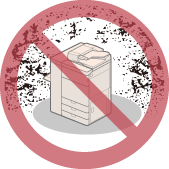
This machine generates a slight amount of ozone etc. during normal use. Although sensitivity to ozone etc. may vary, this amount is not harmful. Ozone etc. may be more noticeable during extended use or long production runs, especially in poorly ventilated rooms. It is recommended that the room be appropriately ventilated, sufficient to maintain a comfortable working environment, in areas of machine operation. In addition, do not install this machine where it exhausts directly onto a person.
Elevation Limitations
Install this machine at an elevation of 4,000 m or less.
*Atmospheric pressure at 4,000 m: 607.8 hPa (reference value)
*Atmospheric pressure at 4,000 m: 607.8 hPa (reference value)
Power Supply
Power Supply Conditions
Use these components within the power supply specifications listed below.
The power supply for components not listed in the table is supplied by the imageRUNNER ADVANCE DX 8905 / 8995 / 8986 or other components.
Product Name | Power Supply | Power Supply Cord/ Plug Specifications | The Length of the Power Cord |
imageRUNNER ADVANCE DX 8905 / 8995 / 8986 | 220-240 V AC, 50/60 Hz, 10A | CEE 7/7 | 1,900 mm ± 50 mm / 2,000 mm ± 50 mm |
POD Deck Lite-C | 220-240 V AC, 50/60 Hz, 1.2 A | CEE 7/7 | 1,900 mm ± 50 mm / 2,000 mm ± 50 mm |
Paper Deck Unit-E | From the main unit | - | - |
Staple Finisher-AG | 220-240 V AC, 50/60 Hz, 8 A | CEE 7/7 | 2,000 mm ± 50 mm |
Booklet Finisher-AG | 220-240 V AC, 50/60 Hz, 8 A | CEE 7/7 | 2,000 mm ± 50 mm |
Document Insertion Unit-R | 100-240 V AC, 50/60 Hz, 1.0 A | CEE 7/7 | 2,000 mm ± 50 mm |
Paper Folding Unit-K | From the finisher | - | - |
Inner Booklet Trimmer-A | From the finisher | - | - |
Puncher Unit-BT | From the finisher | - | - |
Puncher Unit-BU | From the finisher | - | - |
Multi Function Professional Puncher-C | 230 V, 50 Hz, 2.0 A | CEE 7/7 | 2,400 mm |
Staple Finisher-AC | From the main unit | - | - |
Booklet Finisher-AC | From the main unit | - | - |
2/4 Hole Puncher Unit-A | From the finisher | - | - |
4 Hole Puncher Unit-A | From the finisher | - | - |
Staple Finisher-X | 100-240 V AC, 50/60 Hz, 2.8 A | CEE 7/7 | 2,000 mm ± 50 mm |
Booklet Finisher-X | 100-240 V AC, 50/60 Hz, 2.8 A | CEE 7/7 | 2,000 mm ± 50 mm |
Puncher Unit-BG | From the finisher | - | - |
Puncher Unit-BH | From the finisher | - | - |
Inner Booklet Trimmer-A | From the finisher | - | - |
Maximum Energy Consumption
The maximum energy consumption of the imageRUNNER ADVANCE DX 8905 / 8995 / 8986 and other components is listed below.
Product Name | Maximum Energy Consumption |
imageRUNNER ADVANCE DX 8905 / 8995 / 8986 | 2,400 W or less*1 |
POD Deck Lite-C | 480 W or less |
Paper Deck Unit-E | Included in the maximum energy consumption of the main unit (approx. 44 W) |
Staple Finisher-AG | 500 W or less |
Booklet Finisher-AG | 500 W or less |
Document Insertion Unit-R | 120 W or less |
Paper Folding Unit-K | Included in the finisher |
Booklet Trimmer-G | 300 W or less |
Puncher Unit-BT | Included in the finisher |
Puncher Unit-BU | Included in the finisher |
Multi Function Professional Puncher-C | 480 W or less |
Staple Finisher-AC | Included in the main unit |
Booklet Finisher-AC | Included in the main unit |
2/4 Hole Puncher Unit-A | Included in the finisher |
4 Hole Puncher Unit-A | Included in the finisher |
Staple Finisher-X | 311 W (including the Puncher Unit) |
Booklet Finisher-X | 384 W (including the Puncher Unit and Inner Booklet Trimmer-A) |
*1 Including all the optional equipment that has power supplied from the main unit