
9A7Y-0F9
Connecting with Easy Connection
The app (Master Setup) automatically connects the PC and printer to the network via the wireless LAN router. Depending on your model, the selected connection method may not be supported.
|
You cannot connect to an access point that is not protected by security standards supporting Easy Connection. Use a supported access point or connect using a method other than Easy Connection. Wireless LAN (Wi-Fi) Router Information Required for Connection |
Black and White Touch Panel Model / Black and White 5 Lines LCD Model 
On black and white touch panel model, you do not need to press  .
.
. At initial installation
Use the Easy Connection settings provided in the Setup Guide.
For startup other than initial installation
1 | On the control panel, press [Menu]  [Preferences] [Network] [Easy Connection via PC] . [Preferences] [Network] [Easy Connection via PC] . |
2 | Operate following the instructions on the screen. Master Setup detects the printer and the network connection is complete. |
Color Touch Panel Model
At initial installation
Use the Easy Connection settings provided in the Setup Guide.
For startup other than initial installation
1 | On the control panel, press [Menu] in the [Home] screen. |
2 | Press [Preferences] [Network] [Easy Connection via PC]. |
3 | Operate following the instructions on the screen. Master Setup detects the printer and the network connection is complete. |
BX570 Series / BX540 Series / BX510 Series
1
On the control panel, press  in the [Home] screen.
in the [Home] screen.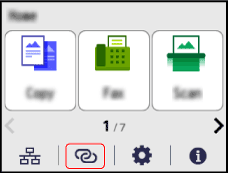
Master Setup detects the printer and the network connection is complete.