
Cleaning the Inline Scanner Unit
Remove any ink or paper dust attached to the glass surface of the inline scanner unit.
Do not use alcohol when cleaning glass surfaces.
Required Preparations
Wear plastic gloves and protective goggles.
If dirt cannot be removed with a dry cleaning cloth, prepare the following cleaning materials.
AlphaWipe TX1004 (commercially available)
Pure water (commercially available)
1
Select [System]  [Maintenance] [Go to maintenance tasks].
[Maintenance] [Go to maintenance tasks].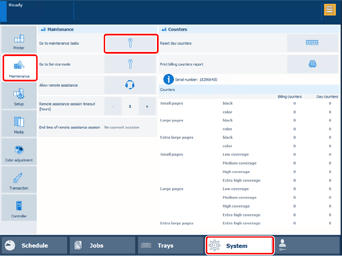
2
Select [Clean inline scanner] [Start].
[Start].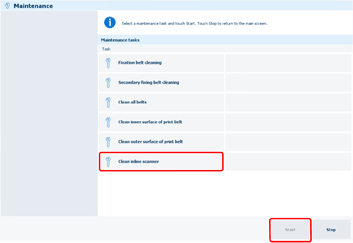
3
Select [Unlock] on the main control panel.
If a screen prompting you to enter a password appears, enter the password.
4
Open the front middle left cover of the PM, and then take out the included cleaning cloth.
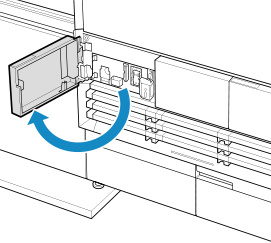
After taking out the included cleaning cloth, close the front middle left cover.
5
Open the front upper cover of the PM.
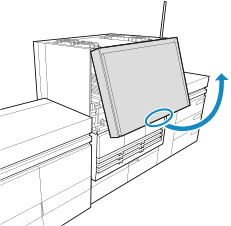
6
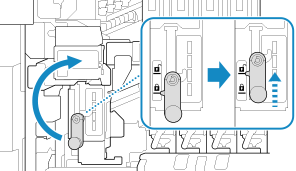
Turn handle A1 clockwise to lift the inline scanner unit up to the unlock position.
7
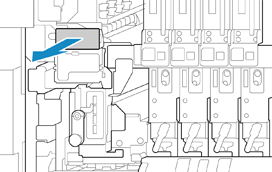
Grip handle A2, then pull out the inline scanner unit.
8
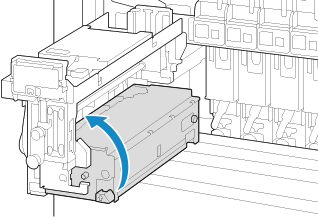
Grip handle A3, then turn the inline scanner unit counterclockwise.
9
Wipe the two glass surfaces.
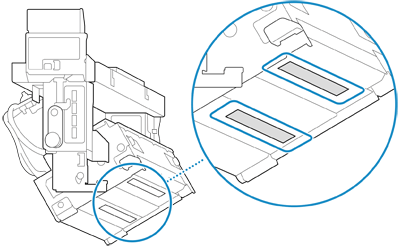
Use the included cleaning cloth to wipe the glasses clean, without dampening the cleaning cloth.
If dirt cannot be removed with a dry cleaning cloth, dampen an AlphaWipe with pure water, wring it out thoroughly, then wipe the glasses with it.
After wiping the glasses using pure water, wipe them again with a dry cloth to ensure that no water remains.
10
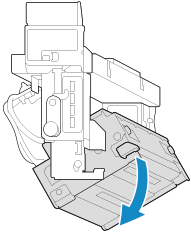
Grip handle A3, then turn the inline scanner unit clockwise.
11
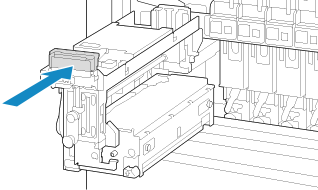
Grip handle A2, then push the inline scanner unit in all the way.
12
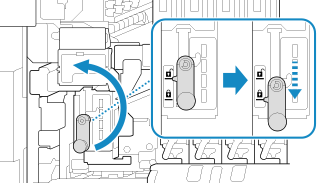
Turn handle A1 counterclockwise to lower the inline scanner unit to the lock position.
13
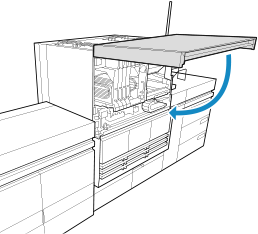
Close the front upper cover of the PM.
14
Open the front middle left cover of the PM, then return the included cleaning cloth to its original position.
After returning the included cleaning cloth, close the front middle left cover of the PM.
15
Press [Finishing cleaning.] on the main control panel.