PIM (Paper Input Module)
The PIM has three paper trays.
The paper trays are sealed to prevent the inflow of outside air and maintain humidity. This prevents the media from gaining or losing moisture, which reduces curling and waving. In addition, separation air is used to achieve stable paper feeding.
The paper trays are sealed to prevent the inflow of outside air and maintain humidity. This prevents the media from gaining or losing moisture, which reduces curling and waving. In addition, separation air is used to achieve stable paper feeding.
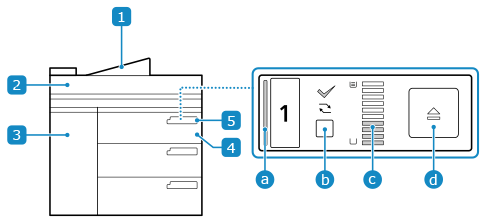
 PIM waste tray
Double-fed sheets and sheets fed during a paper jam are output here.
 PIM top cover
Open this cover when clearing a paper jam in the paper path.
 PIM front cover
Open this cover when clearing a paper jam in the paper path.
 Paper tray
Load the media stack into the paper tray.
 PIM control panel
You can check the status of the PIM and the amount of media remaining, and operate the paper tray.
 Status bar
Indicates the PIM status.
LED Indication | Status |
Steady green | The current job is using the paper tray. |
Steady red | The LED is lit in the following cases: When a paper jam has occurred in the paper tray When too much media has been loaded When the loaded media does not match the size set with the paper holders of the paper tray When the open button is pressed but the paper tray cannot be opened When the lifter operation is slow When the separation unit is moving up |
Off | The LED is off in the following cases: When the module is on standby When the module is in sleep mode When the paper tray is empty |
 Media information status indicator/unassign media information button
Indicates whether media information is assigned to the media currently loaded in the paper tray. Press the button to unassign the media type. Both LEDs are off when the module is in the sleep mode.
 : Assigned
 : Unassigned
 Paper level indicator
Indicates the remaining amount of the loaded media. The LED is off when the module is in the sleep mode, when the lifter is operating, or when a paper tray is open.
 Open button
Opens the paper tray. The LED flashes green while the lifter is operating.