Paper Output Process
This section describes media transport and the locations of the paper output process.
Paper Output Process Locations
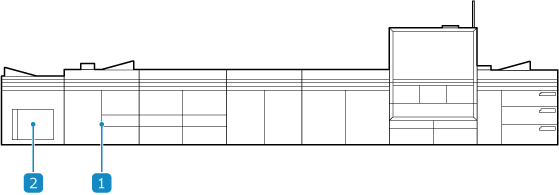
 TM (Turning Module)
Inverts the media according to the paper output settings.
 STM (Stacking Module)
Outputs printed media to the stack tray inside the STM. You can pull out the stack tray and dolly together to retrieve the printed media. If multiple STMs are connected, printing can continue while you retrieve the printed media. You can connect up to three STMs.
Paper Transport in the Paper Output Process
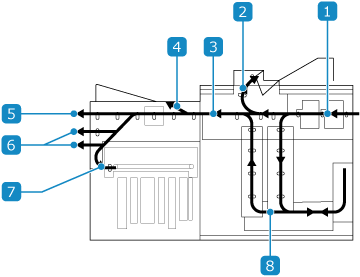
The media is cooled by blowing outside air onto it.
Media, such as media for adjusting density irregularities, media detected by the media deformation detection unit to have curling or waving, and media ejected when a paper jam occurs, is output here.

The media is transported to the STM (Stacking Module).

The printed media (prints and proof prints) are output here.

If multiple STMs are connected, the media is transported to the next STM.

If an optional finisher is attached, the media is transported to the finisher via the STM. For details, contact your dealer or service representative.

The printed media is stored in the stack tray.

The media is inverted for appropriate transport if either of the following trays is set as the output destination and the following print settings are configured.
Stack tray: When performing 1-sided printing with the printed side output face up or performing 2-sided printing with the front side output face down
Top tray: When performing 1-sided printing with the printed side output face down or performing 2-sided printing with the front side output face up