Starting/Shutting Down the Press
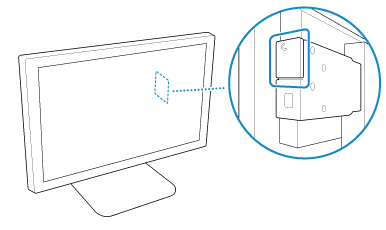
Use PRISMAsync to start or shut down the press. When the press is in the sleep mode, press the sleep button on the main control panel to wake up the press.
NOTE
Power States of the Press
The varioPRINT iX1700 has four power states.
Active: The press is printing a job, processing a job, or executing a maintenance operation.
Ready: The press is prepared to be operated or receive a print job.
Sleep mode: This mode reduces the energy consumption of the press. You can place the press in the sleep mode when it is not in use in order to reduce power consumption.
The press operates as follows while it is in the sleep mode.
The press operates as follows while it is in the sleep mode.
The main control panel enters the energy-saving mode.
The power of PRISMAsync remains ON.
The power of the modules connected to the PM (Print Module) is turned OFF.
Shutdown mode: Shutting down the press reduces the energy consumption further than the sleep mode.
The press operates as follows while it is in the shutdown mode.
The press operates as follows while it is in the shutdown mode.
The main control panel enters the energy-saving mode.
The power of PRISMAsync is turned OFF.
The power of the modules connected to the PM (Print Module) is turned OFF.
Waking up the Press
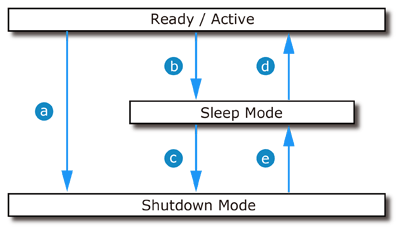
When the press is in the sleep mode, press the sleep button once to start the press. (  )
)
)When the press is in the shutdown mode, press the sleep button once to have the press enter the sleep mode (  ), then press the sleep button again. ( )
), then press the sleep button again. ( )While in the sleep mode, the press automatically wakes up ( ) when:
) when:The current time reaches the time specified for automatic wake-up
The current time reaches the execution time of a scheduled job
Switching to the Sleep Mode
When you press the sleep button once, the press enters the sleep mode. (  )
)
)While in the ready/active mode, the press automatically enters the sleep mode ( ) when:
) when:The time set for the sleep mode timer elapses
Shutting Down the Press
When you shut down the press from the main control panel, the press shuts down. (  )
)
)While in the sleep mode, the press automatically enters the shutdown mode (  ) when:
) when:The current time reaches the time set for automatic shutdown
IMPORTANT
To turn the power of the press OFF in an emergency, switch off the breakers and disconnect the power plugs. For information on the positions of the breakers and how to operate them, see the following. Shutting Down the Power in an Emergency
NOTE
If the press will not be used for an extended period of time (one month or longer), contact your service representative. The ink must be drained.