This section describes the procedure for outputting edited device settings information to a file.
The structure of the output device settings information is indicated below.
Outputting Device Settings Information to a File
When new settings information is created:
The items indicated by (3) in "Overall View of Device Settings Information" are output. If items included in (5) are selected to be output, (5) is also output. If items included in (7) are selected to be output, (7) is also output.
 IMPORTANT
Only Administrator information is included in (7). Therefore, if device settings information that includes (7) is created and imported into the device, users other than Administrator that were registered in the device are deleted.
When some settings included in existing device settings information are changed:
The items indicated by (1), (3), and (8) in "Overall View of Device Settings Information" are output. If items included in (5) are selected to be output, (4) and (5) are also output. If items included in (7) are selected to be output, (6) and (7) are also output.
IMPORTANTThe categories included in device settings information and the editable items differ according to the model.
The user information other than that of the administrator in the categories below cannot be edited with this software.
[Department ID Management Settings]
[Authentication User Management]
If device settings information that includes (5) and (7) is created and imported into the device after the device settings information that includes these categories is edited, user information that was registered in the device is deleted, and user information that is included in the device settings information is registered.
When you create device settings information that includes (5), based on device settings information that does not include the [Department ID Management Settings] category:
If you import such device settings information into the device, only the [System Manager ID] setting registered in the device is changed, while other Department IDs retain their pre-import settings.
When you create device settings information that includes (7), based on device settings information that does not include the [Authentication User Management] category:
If you import such device settings information into the device, only the Administrator setting registered in the device is changed, while users other than Administrator are deleted.
Overall View of Device Settings Information
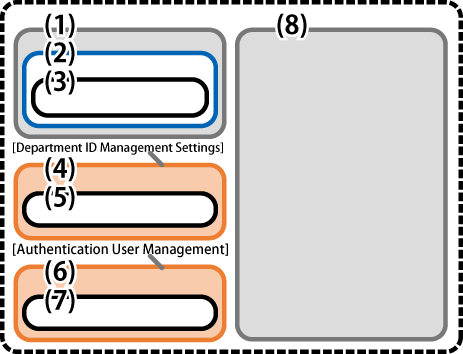
(1): | Categories for editing (excluding the [Department ID Management Settings] and [Authentication User Management] categories) |
(2): | Items in (1) that can be edited by this software (items displayed on the [Edit Device Setting Values] screen) For more information on the target items, see the following. List of Editable Items (Displayed in a separate tab) |
(3): | Items in (2) that are selected on the [Edit Device Setting Values] screen |
(4): | All items included in the [Department ID Management Settings] category Items other than (5) cannot be edited with this software. |
(5): | [System Manager ID] and [System PIN] This setting is in the following location of this software. [Settings/Registration] - [Management Settings] - [User Management] - [System Manager Information Settings] You cannot set to output only one of these. |
(6): | All items included in the [Authentication User Management] category Items other than (7) cannot be edited with this software. |
(7): | [Administrator Password] This setting is in the following location of this software. [Settings/Registration] - [System Management Settings] - [User Management] - [Authentication User Management] |
(8): | Categories not for editing The items in the categories included here cannot be edited with this software. The categories included here differ according to the device settings information file. (This is because the categories to retrieve can be specified when retrieving the device settings information from the device.) |
1.
Click [ Save As].
Save As].2.
Specify the location to save to → click [Save].