Adjusting the Paper Fold Position
Adjust the fold position toward the left or right so that it is at the center of the paper.

* Adjustment can be performed only when an option that supports the fold function is installed on the machine.
Use the control panel to adjust the paper fold position. You cannot perform adjustment using Remote UI from a computer.
For C7100 Series and C5100 Series
1
On the control panel, press [ Settings/Registration] in the [Home] screen or other screen. [Home] Screen
Settings/Registration] in the [Home] screen or other screen. [Home] ScreenThe [Settings/Registration] screen is displayed.
2
Press [Adjustment/Maintenance]  [Adjust Action] [Adjust Fold Position].
[Adjust Action] [Adjust Fold Position].The [Adjust Fold Position] screen is displayed.
3
Adjust the fold position.
When Adjusting the Z-Fold Position
1
Press [Adjust Z-Fold Position].
2
Select the paper size to adjust.
3
Enter the adjustment value.
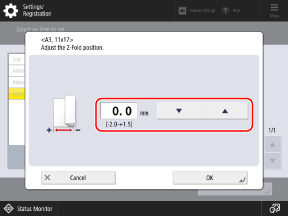
Set a positive (+) value to shift the position toward the left of the paper when it is spread open, or set a negative (-) value to shift the position toward the right.
4
Press [OK] [Close].
[Close].The adjusted settings are applied.
When Adjusting the Saddle C-Fold Position
1
Press [Adjust Saddle C-Fold Position].
2
Select the paper size to adjust.
3
Enter the adjustment value.
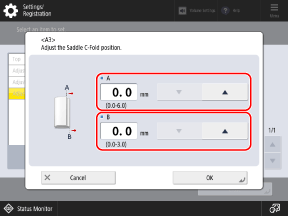
Adjust the [A] value to shift the right edge of the top overlapping surface toward the right, or adjust the [B] value to shift the position of the right fold toward the right.
4
Press [OK] [Close].
[Close].The adjusted settings are applied.
When Adjusting the Saddle Fold Position
1
Press [Adjust Saddle Fold Position].
2
Check the displayed instructions, and press [Next].
3
Select the paper source with the loaded usable paper, and press [Start Printing].
A test page is printed.
4
Select the current state of the fold position, and adjust the shift width.
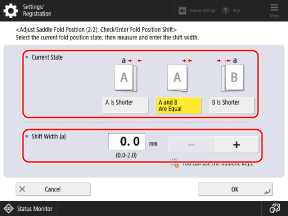
Check the current state of the fold position and the shift width on the test page, then select the current state and set the shift width.
5
Press [OK].
6
Press [Start Printing] to print the test page again, and check the adjustment results.
To end the adjustment without printing the test page, press [Done].
7
Press [Done].
If further adjustment is needed, press [Re-Adjust] and repeat Steps 4 to 6.
4
Press [Close].
For C3100 Series
1
On the control panel, press [ Settings/Registration] in the [Home] screen or other screen. [Home] Screen
Settings/Registration] in the [Home] screen or other screen. [Home] ScreenThe [Settings/Registration] screen is displayed.
2
Press [Adjustment/Maintenance] [Adjust Action] [Adjust Fold Position].
[Adjust Action] [Adjust Fold Position].The [Adjust Fold Position] screen is displayed.
3
Check the displayed instructions, and press [Next].
4
Select the paper source with the loaded usable paper, and press [Start Printing].
A test page is printed.
5
Select the current state of the fold position, and adjust the shift width.
Check the current state of the fold position and the shift width on the test page, then select the current state and set the shift width.
6
Press [OK].
7
Press [Start Printing] to print the test page again, and check the adjustment results.
To end the adjustment without printing the test page, press [Done].
8
Press [Done].
If further adjustment is needed, press [Re-Adjust] and repeat Steps 5 to 7.
9
Press [Close].