Stack Bypass Alignment Tray-D
When you want to reduce the amount of image misalignment on the paper (due to paper being fed at an angle), attach Stack Bypass Alignment Tray-D to the multi-purpose tray. This enables you to reduce the shift amount of the print position.
IMPORTANT
Be careful not to get your hands caught in the gap between Stack Bypass Alignment Tray-D and POD Deck Lite-C when clearing paper jams while POD Deck Lite-C is attached.
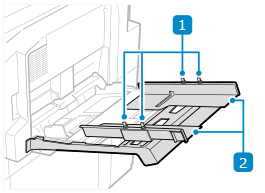
 Fixing screws
Tighten or loosen the screws to adjust the paper alignment guides.
 Paper alignment guides
Stabilize the position of the loaded paper.