Paper Jams in the Front-Left Cover of the Main Unit
Remove the paper jammed inside the front-left cover of the main unit. Follow the instructions on the control panel to check the location of the paper jam and remove the jammed paper.
If the paper tears, be sure to remove all parts so that no pieces remain.
If you cannot remove the paper, do not try to remove it forcibly. Check the control panel and remove the jammed paper at another location.
If the paper tears, be sure to remove all parts so that no pieces remain.
If you cannot remove the paper, do not try to remove it forcibly. Check the control panel and remove the jammed paper at another location.
* Even when a screen appears prompting you to clear paper jams in the front-left cover of the main unit, it is possible that Long Sheet paper is jammed in the machine near the multi-purpose tray. Paper Jams in Long Sheet Tray-B (Option)
1
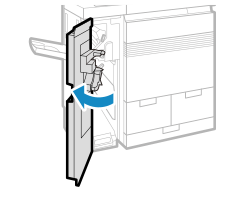
Open the front-left cover of the main unit.
2
Check whether paper is jammed in the guide.
1
Open the buffer pass lower guide (B1) ( ) and buffer pass upper guide (B2) (
 ).
).
) and buffer pass upper guide (B2) ().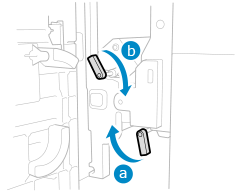
Open the buffer pass lower guide (B1) () and buffer pass upper guide (B2) () in that order.
) and buffer pass upper guide (B2) () in that order.2
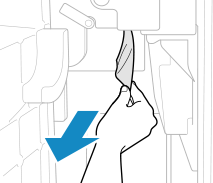
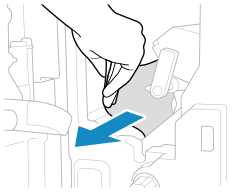
If the paper is jammed, gently pull it out in the direction of the arrow.
When the paper is jammed in the buffer pass lower guide (B1)
When the paper is jammed in the buffer pass upper guide (B2)
3
Check whether paper is jammed inside the lower left cover (B4).
1
Open the lower left cover (B4).
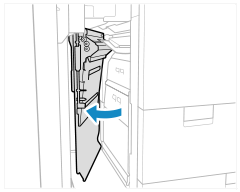
2
If paper is jammed, gently pull it out in the direction of the arrow.
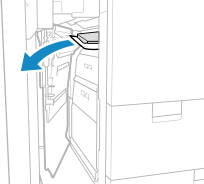
3
Open the inner left guide (B5).
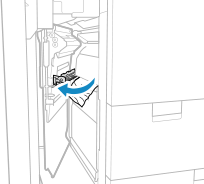
4
If paper is jammed, gently pull it out in the direction of the arrow.
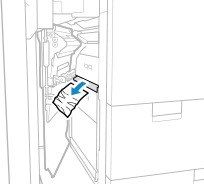
5
Close the inner left guide (B5).
6
Close the lower left cover (B4).
4
Close the buffer pass upper guide (B2) and buffer pass lower guide (B1).
Close the buffer pass upper guide (B2) and buffer pass lower guide (B1) in that order.
5
Close the front-left cover of the main unit.
When the paper jam is cleared, the screen indicating a paper jam disappears, and printing resumes automatically.
If a screen indicating a paper jam at a different location appears, continue following the instructions on the screen to remove the jammed paper.
If the screen indicating a paper jam does not disappear after you remove the Long Sheet paper and close the front-left cover of the main unit, you can close the screen by opening and closing the front cover of the insertion unit or finisher.
NOTE
If Paper Jams Occur Repeatedly
Check the status of the machine and paper. Paper Jams That Occur Repeatedly