Paper Jams in the Paper Source
Remove the paper jammed inside the paper source. Follow the instructions on the control panel to check the location of the paper jam and remove the jammed paper.
If the paper tears, be sure to remove all parts so that no pieces remain.
If you cannot remove the paper, do not try to remove it forcibly. Check the control panel and remove the jammed paper at another location.
If the paper tears, be sure to remove all parts so that no pieces remain.
If you cannot remove the paper, do not try to remove it forcibly. Check the control panel and remove the jammed paper at another location.
Paper Jams in Paper Drawer 1
This section describes how to clear paper jams in paper drawer 1. Follow the instructions on the control panel to check the location of the paper jam and remove the jammed paper.
Required Preparations
Close the cover and paper drawer if they are open.
1
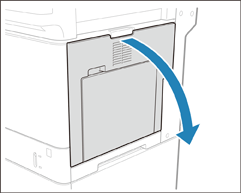
Open the right cover of the main unit.
2
Check whether paper is jammed around the feed roller.
1
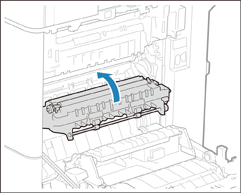
Lift up the delivery unit.
2
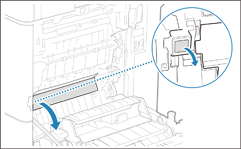
Open the delivery guide.
3
If paper is jammed, gently pull it out in the direction of the arrow.
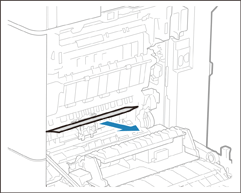
Do not touch the light blue knob located inside the delivery guide. Doing so may cause paper jams.
4
Close the delivery guide.
3
Check whether paper is jammed in the paper drawer 1.
1
Hold the handle of the paper drawer and pull it out until it stops.
2
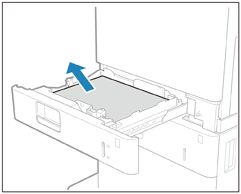
If paper is jammed, gently pull it out in the direction of the arrow.
3
Gently insert the paper drawer into the machine.
4
Gently close the right cover of the main unit until they click.
Continue following the instructions on the screen to proceed with the interrupted operation or continue clearing paper jams.
Paper Jams in Paper Drawer 2 (Option)
This section describes how to clear paper jams in paper drawer 2. Follow the instructions on the control panel to check the location of the paper jam and remove the jammed paper.
Required Preparations
Close the cover and paper drawer if they are open.
1
Open the right cover of the main unit.
2
Check whether paper is jammed around the feed roller.
1
Lift up the delivery unit.
2
Open the delivery guide.
3
If paper is jammed, gently pull it out in the direction of the arrow.
Do not touch the light blue knob located inside the delivery guide. Doing so may cause paper jams.
4
Close the delivery guide.
3
Gently close the right cover of the main unit until they click.
4
Check whether paper is jammed in the right cover of the paper drawer.
1
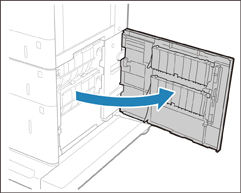
Open the right cover of the paper drawer.
2
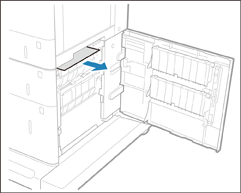
If paper is jammed, gently pull it out in the direction of the arrow.
5
Check whether paper is jammed in the paper drawer.
1
Hold the handle of the paper drawer and pull it out until it stops.
2
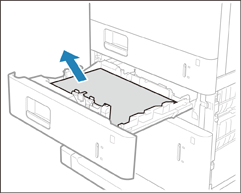
If paper is jammed, gently pull it out in the direction of the arrow.
3
Gently insert the paper drawer into the machine.
6
Gently close the right cover of the paper drawer until they click.
Continue following the instructions on the screen to proceed with the interrupted operation or continue clearing paper jams.
Paper Jams in Paper Drawers 3 and 4 (Option)
This section describes how to clear paper jams in paper drawers 3 and 4. Follow the instructions on the control panel to check the location of the paper jam and remove the jammed paper.
Required Preparations
Close the cover and paper drawer if they are open.
1
Check whether paper is jammed in the right cover of the paper drawer.
1
Open the right cover of the paper drawer.
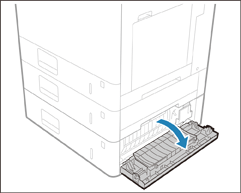
Cassette Module-AG
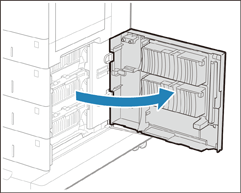
Cassette Feeding Unit-AX
2
If paper is jammed, gently pull it out in the direction of the arrow.
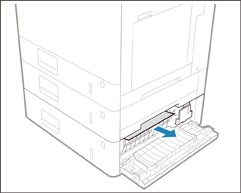
Cassette Module-AG
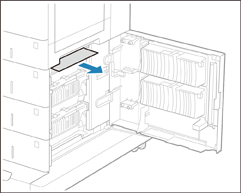
Cassette Feeding Unit-AX
2
Check whether paper is jammed in the paper drawer.
1
Hold the handle of the paper drawer and pull it out until it stops.
2
If paper is jammed, gently pull it out in the direction of the arrow.
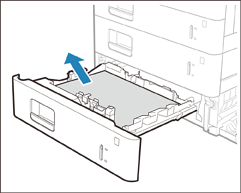
Cassette Module-AG
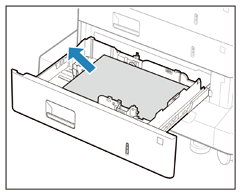
Cassette Feeding Unit-AX
3
Gently insert the paper drawer into the machine.
3
Gently close the right cover of the paper drawer until they click.
Continue following the instructions on the screen to proceed with the interrupted operation or continue clearing paper jams.
NOTE
If Paper Jams Occur Repeatedly
Check the status of the machine and paper. Paper Jams That Occur Repeatedly