Finishing with the Stapler (For the Model with the Finisher)
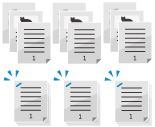
The copied paper is stapled when output.
* When using the staple function, pay careful attention to the orientation of the placed original and the staple position setting. Orientation of an Original to Be Stapled and Setting the Staple Position (C611FZ / C611Z / C521FZ / C521Z / C431FZ / C431Z / C331FZ / C331Z)
* When using the staple function, pay careful attention to the orientation of the placed original and the staple position setting. Orientation of an Original to Be Stapled and Setting the Staple Position (C611FZ / C611Z / C521FZ / C521Z / C431FZ / C431Z / C331FZ / C331Z)
1
On the copy screen, press [Options]  [Finishing]. Copy Screen
[Finishing]. Copy ScreenThe [Finishing] screen is displayed.
Select [Staple + Collate] or [Staple + Group], and press [Next].
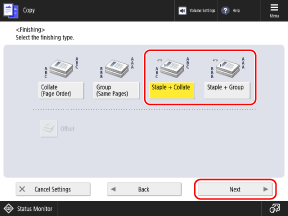
To staple each set of copies, select [Staple + Collate].
To staple each group of pages, select [Staple + Group].
3
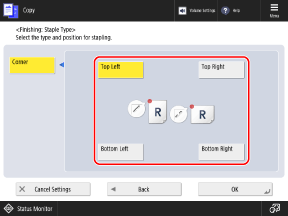
Select the staple position.
4
Press [OK] [Close].
[Close].The copy screen is displayed again.