Cleaning the Dust Proof Glass
If the printout is still smudged or has white streaks (lines) or white spots even after cleaning the machine surface, platen glass, and feeder, the dust proof glass may be dirty. In this case, clean the dust proof glass.
1
Turn OFF the power and remove the power cord from the outlet. Turning OFF the Machine
Check the operation status of the machine before turning it OFF. Turning OFF the machine during an operation may cancel the operation or result in data corruption or damage.
Wait at least three seconds after the Main Power indicator turns off before unplugging the power cord.
2
Open the front cover of the machine.
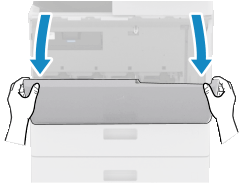
Open the cover while holding both sides.
Pull out the toner cartridge.
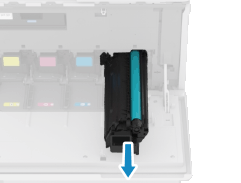
Be careful not to touch the lead edge of the toner cartridge or bump or otherwise impact the toner cartridge. Toner may leak.
Insert the removed toner cartridge back into place.
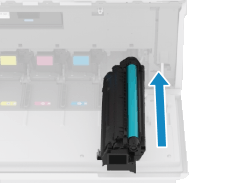
Before installing the toner cartridge, confirm that the color of the toner cartridge and the color indicated on the slot of the main unit are the same.
5
6
Close the front cover of the machine.
7
Plug the power cord into the outlet, and turn ON the machine. Turning ON the Machine