Paper Jams Inside the Main Unit
Remove the paper jammed inside the main unit. Follow the instructions on the control panel to check the location of the paper jam and remove the jammed paper.
If the paper tears, be sure to remove all parts so that no pieces remain.
If you cannot remove the paper, do not try to remove it forcibly. Check the control panel and remove the jammed paper at another location.
If the paper tears, be sure to remove all parts so that no pieces remain.
If you cannot remove the paper, do not try to remove it forcibly. Check the control panel and remove the jammed paper at another location.
Required Preparations
Close the cover and paper drawer if they are open.
If you are using C611FZ / C611Z / C521FZ / C521Z / C431FZ / C431Z / C331FZ / C331Z, first check whether paper is jammed in the finisher. Paper Jams in the Finisher (For C611FZ / C611Z / C521FZ / C521Z / C431FZ / C431Z / C331FZ / C331Z Only)
1
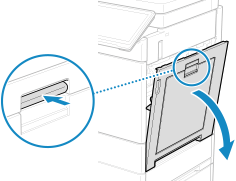
Push the lever and open the right cover of the main unit.
2
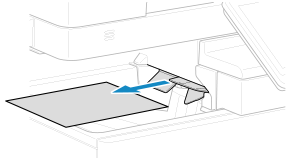
If paper is jammed in the output tray, gently pull it out in the direction of the arrow.
3
Check whether paper is jammed inside the fixing assembly.
1
Remove the fixing assembly and place it on a flat surface.
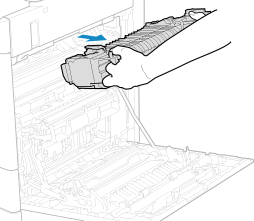
Hold the light blue part of the fixing assembly with fingers of both hands, and pull it out horizontally.
2
If paper is jammed, open the guide of the fixing assembly and gently pull out the paper in the direction of the arrow.
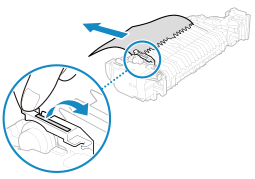
If the paper is partly out from the lower side (entry side) of the fixing assembly, gently pull out the paper in the downward direction.
3
Close the guide of the fixing assembly.
4
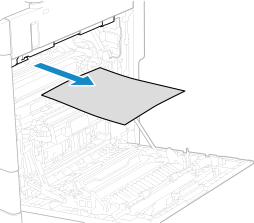
If paper is jammed in the area where the fixing assembly was removed, gently pull it out in the direction of the arrow.
5
Return the fixing assembly back into position.
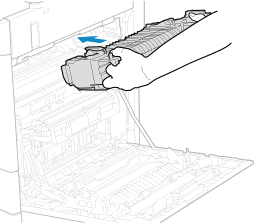
Hold the light blue part of the fixing assembly with fingers of both hands and push the fixing assembly straight in until you hear a click.
6
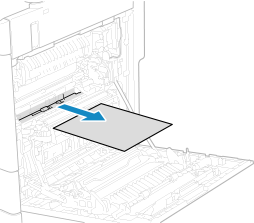
If paper is jammed around the feed roller, gently pull it out in the direction of the arrow.
7
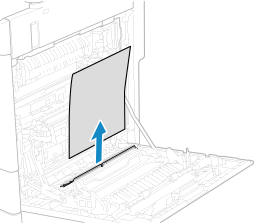
If paper is jammed in the multi-purpose tray paper supply area, gently pull it out in the direction of the arrow.
8
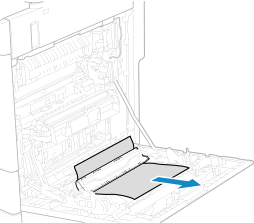
If paper is jammed in the duplex unit, gently pull it out in the direction of the arrow.
9
Gently close the right cover of the main unit until you hear a click.
When the paper jam is cleared, the screen indicating a paper jam disappears, and printing resumes automatically. If a screen indicating a paper jam at a different location appears, continue following the instructions on the screen to remove the jammed paper.
NOTE
If Paper Jams Occur Repeatedly
Check the status of the machine and paper. Paper Jams That Occur Repeatedly