
Available Paper
The paper types that can be used with this machine are shown in the following table.
For available paper with options attached, see the specifications of respective options.
Also, confirm the precautions regarding paper use.
For available paper with options attached, see the specifications of respective options.
Also, confirm the precautions regarding paper use.
Supported Paper Sizes
Paper Sizes | Paper Source (Standard) | Paper Source (Optional) | |
Paper Drawer 1 | Multi-Purpose Tray | Cassette Feeding Module-AM | |
A4 |  | | |
A4R | | | |
A3 | | | |
A5 | - | | |
A5R | | | - |
A6R | - | | - |
B4 | | | |
B5 | | | |
B5R | | | |
16K | | | |
16KR | | | |
8K | | | |
LTR | | | |
LTRR | | | |
LGL | | | |
11x17 | | | |
STMT | - | | |
STMTR | | | - |
EXEC | - | | - |
FOOLSCAP/FOLIO | | | - |
OFICIO | | | - |
LEGAL (India) | | | - |
FOOLSCAP (Australia) | | | - |
F4A | | | - |
LETTER (Government) | | | - |
LETTERR (Government) | | | - |
LEGAL (Government) | | | - |
OFICIO (Mexico) | | | - |
OFICIO (Ecuador) | | | - |
OFICIO (Argentina) | | | - |
LETTER (Argentina) | | | - |
LETTERR (Argentina) | | | - |
OFICIO (Brazil) | | | - |
Custom Size (95.0 mm x 139.7 mm to 297 mm x 431.8 mm) | - | | - |
No.10 (COM10) | - | | - |
ISO-C5 | - | | - |
DL | - | | - |
Monarch | - | | - |
| ||||||||
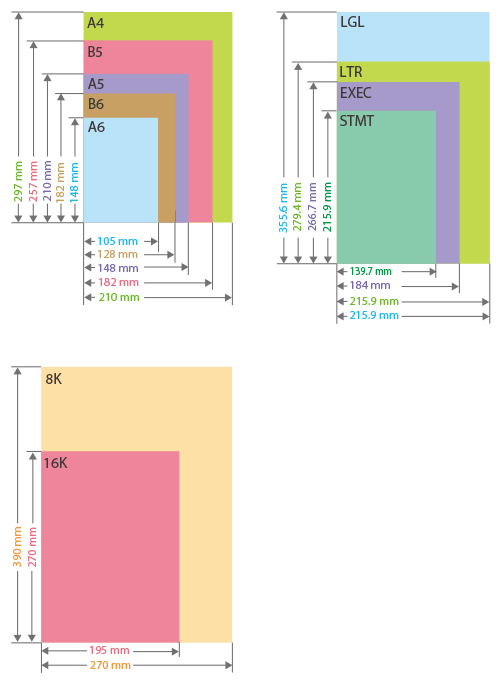
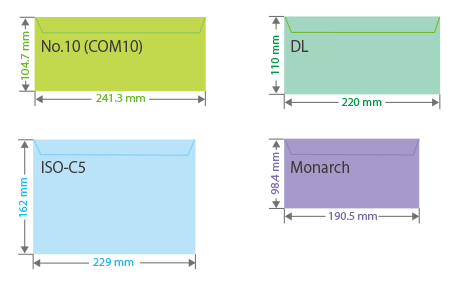
Paper sizes supported by this machine |
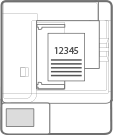
 ) to the front of the machine is referred to as the "vertical" side while the side parallel (
 ) to the front of the machine is referred to as the "horizontal" side.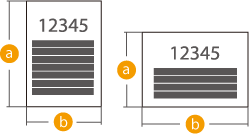
Portrait orientation | Landscape orientation | ||
 | 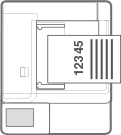 |
"A4R," "A5R," "B5R," "LTRR," and "STMTR" refer to A4 / A5 / B5 / LTR / STMT size paper placed in landscape orientation, respectively.
Supported Paper Types
Chlorine-free paper can be used with this machine.
Paper Type | Paper Weight | Paper Source (Standard) | Paper Source (Optional) | |
Paper Drawer 1 | Multi-Purpose Tray | Cassette Feeding Module-AM | ||
Thin | 60 to 63 g/m2 | - | | - |
Plain 1 | 64 to 75 g/m2 | | | |
Plain 2 | 76 to 90 g/m2 | | | |
Heavy 1 | 91 to 105 g/m2 | - | | - |
Heavy 2 | 106 to 128 g/m2 | - | | - |
Heavy 3 | 129 to 157 g/m2 | - | | - |
Color | 64 to 80 g/m2 | | | |
Recycled*1 | 64 to 80 g/m2 | | | |
Pre-punched | 75 to 80 g/m2 | | | |
Labels | 151 to 181 g/m2 | - | | - |
Bond | 75 to 90 g/m2 | - | | - |
Envelope | 75 to 105 g/m2 | - | | - |
*1 You can use 100% recycled paper.
Paper Available for Two-Sided Copying/Two-Sided Printing
When performing 2-sided copying or 2-sided printing, use paper that meets the following requirements.
Paper size: | A3, B4, A4R, A4, B5R, B5, A5R, 11" x 17", LGL, LTRR, LTR, STMTR, EXEC, 8K, 16KR, 16K, FOOLSCAP/FOLIO, OFICIO, LEGAL (India), FOOLSCAP (Australia), F4A, LETTER (Government), LETTERR (Government), LEGAL (Government), OFICIO (Mexico), OFICIO (Ecuador), OFICIO (Argentina), LETTER (Argentina), LETTERR (Argentina), and OFICIO (Brazil) |
Paper type: | Thin, Plain 1 to Plain 2, Color, and Recycled |
Paper weight: | 60 g/m² to 90 g/m² |
If using other paper, use <2nd Side of 2-Sided Page> to copy/print on the back side of printed paper.
Unusable Paper
Before printing, check whether the paper to use is suitable. Do not use the following types of paper, as theycan cause paper jams or printing errors:
Wrinkled, creased, curled, torn, or damp paper*1
Thin straw paper, very thin paper, coarse paper, glossy paper
Paper with glue or other adhesive sticking out or label paper whose back side can be easily peeled off
Paper printed by a thermal transfer printer, back side of paper printed by a thermal transfer printer
*1 Printing on damp paper may cause steam to be emitted from the output area or water droplets to adhere to theoutput part, but this does not indicate a malfunction. This is because the water contained in the paper evaporates dueto the heat generated when the toner fixes to the paper. This is more likely to occur when the room temperature is low.
Precautions Regarding Paper
 |
When using paperOnly use paper that has fully acclimatized to the environment in which this machine is installed. Using paper that has been stored under different temperature or humidity may cause paper jams or result in poor print quality. Paper handling and storageWe recommend using the paper immediately after opening the package. Rewrap any remaining paper in its original package, and store it on a flat surface. Keep the paper wrapped in its original package to protect the paper from moisture or dryness. Do not store the paper in such a way that may cause it to curl or fold. Do not store the paper vertically or stack too much paper. Do not store the paper in direct sunlight, or in a place subject to high humidity, dryness, or drastic changes in temperature or humidity. |
 When printing on paper that has absorbed moisture |
Steam may emit from the paper output area, or water droplets may form around the paper output area. There is nothing unusual about any of these occurrences, which occur when the heat generated from fixing toner on the paper causes moisture in the paper to evaporate (most likely to occur at low room temperatures). |
Storing Paper Printed With the Machine
Be aware of the following precautions when handling and storing paper printed using the machine.
Storing Printed Paper
Store the paper on a flat surface.
Do not store paper together with items made from PVC (polyvinyl chloride), such as clear folders. The toner may melt, causing paper to become stuck to PVC-based material.
Store paper so that it does not become folded or wrinkled. Doing so may cause the toner to come off.
If you intend to store paper for long periods (two or more years), preserve them in a binder, etc.
Long-term storage may cause paper to discolor, which in turn may cause print to appear discolored.
Do not store paper in places with high temperatures.
Precautions when sticking printouts with adhesive
Be sure to use insoluble adhesive.
Test the adhesive on an unneeded printout before using.
Before stacking printouts that stuck with adhesive, check that the adhesive completely dried.