Outputting Counter Total Results
This section describes the method for displaying the total results for the print, copy, and scan counters retrieved from devices on the screen and outputting them to a file.
The following reports can be output for all devices or the devices that belong to the specified group and region.
Total results of the specified counter type for each device (total unit: day/week/month/year)
Total results of each counter type for the specified device (total unit: day/week/month/year)
Total results of each counter type for all devices (total unit: day/week/month/year)
Total results of each counter type from factory shipping until the current time for each device
NOTE |
Totals are performed according to the time zone of the region where the device is running. The target for totaling is the information within the period set on the page indicated below. If the specified total period is longer than this period, some old information may be left out. [Devices] menu > [Device Communication Settings] > [Data Retention Period] tab Devices that do not support the counter retrieval function of this software are not displayed in the list. Counter retrieval results can also be sent via e-mail. For details, see the following. The counter information can also be checked on the dashboard. |
1.
Select the [Reports] menu > [Counters].
2.
Switch the display using the drop-down list on the top of the list on the [Counters] page.
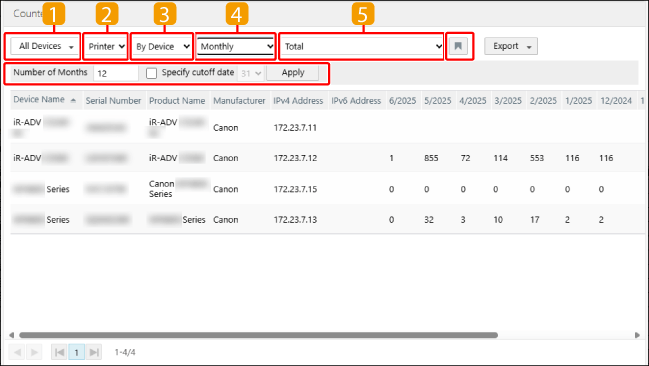
 | Select the target devices for totaling. When selecting a device group or region, you can enter a string in the [Search] text box of the drop-down list to filter the candidates displayed in the drop-down list. The region is displayed for users with multiple regions set. |
 | Select the device type for totaling. |
 | Select the type of report to display. |
[By Device] | Displays the total results of the specified counter type for each printer. |
[By Counter] | Displays the total results of each counter type for all devices. |
[Lifetime] | Displays the total results of each counter type from factory shipping until the current time for each devices. |
 | When [By Device] or [By Counter] is selected in  , select the total unit. , select the total unit.Each total period is indicated below. [Daily]: 1 month [Weekly]: 25 weeks [Monthly]: The default value is 12 months. In [Number of Months], you can specify a period from 12 months to 100 months. [Yearly]: The default value is 5 years. In [Number of Years], you can specify a period from 3 years to 8 years. [Specified Period]: Specify the start date and end date of the total period in [Period], then click [Apply]. |
[Specify cutoff date] | To specify the cutoff date, select the [Specify cutoff date] check box. Select the cutoff date in the drop-down list, then click [Apply]. This item is displayed when [Monthly] is selected as the total unit. If the specified cutoff date does not exist for a month, the cutoff date is the last day of the month. |
 | When [By Device] is selected in , select the counter to display. |
 | The selection state of the drop-down list and the sorting order of the list are saved. |
3.
Display the total results of individual devices, as required.
Click the device name of the target device.
Change the total unit as required.
NOTE |
When [By Device] or [Lifetime] is selected in , you can display the total results for individual devices. If the value of a counter retrieved for a device during the total period is one or more, a graph is displayed below the table of the total results.If you selected [By Device] and specified [Specified Period] for the total unit, you cannot display the total results of individual devices. |
4.
To output the content displayed on the screen, select the file format of the report to output in the [Export] drop-down list on the top of the list.
Follow the direction on the screen to save the file.
There are cautions to follow when exporting to a CSV file or Excel file. For details, see the following.