Creating Batch Tasks
This section describes the method for creating a batch task.
You can set combinations of tasks to consecutively execute and execute them as a single task. The next process to execute can also be changed according to the execution result of the previous task.
1.
Select the [Tasks] menu > [Task List].
2.
Click [Create] on the [Task List] page.

3.
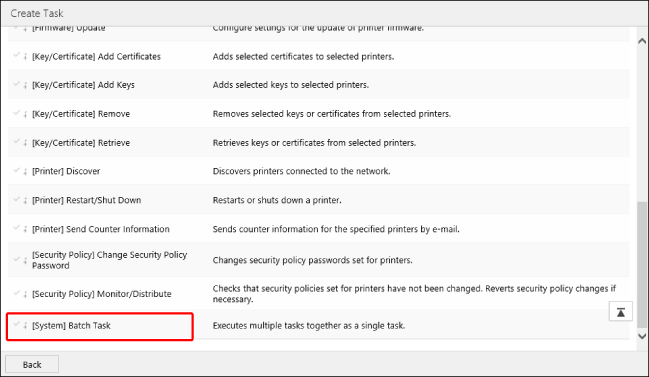
Select [[System] Batch Task] in the list on the [Create Task] page.
4.
On the [Scheduled] tab of the [Batch Task] page, specify the basic information and schedule of the task.
For details on configuring the [Scheduled] tab, see the following.
5.
On the [Targets] tab, specify the target devices for the task.
For details on specifying devices on the [Targets] tab, see the following.
6.
On the [Task-Specific Settings] tab, add the tasks to execute in succession as subtasks and their order.
Adding a subtask
Select the subtask to add from the menu displayed by clicking [ ] (Add).
] (Add).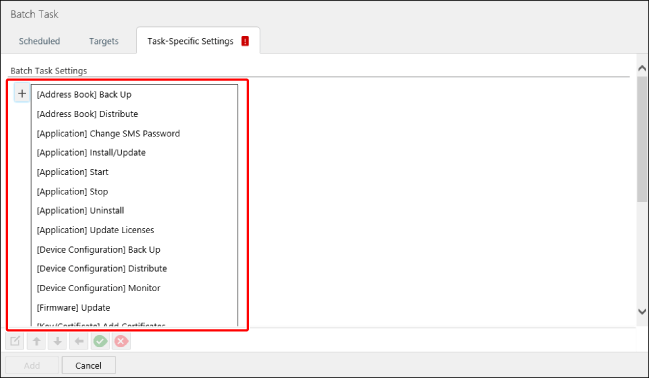
In [Edit Subtask], enter a name indicating the content of the subtask in [Name].
Configure the required settings in the settings displayed according to the type of task.
The settings differ according to the type of task.
Click [Save].
Repeat the procedure for adding subtasks as required.
To set the end process and the conditions for executing the next subtask, select one of the following items from the menu displayed by clicking [] (Add).
] (Add).[End batch task] | Select this to end the process with the execution result of the batch task as "Success" without executing subsequent subtasks that are set. When combined with [  ] and [ ] and [ ], the process is only ended for devices that meet the conditions. The subsequent subtasks are executed for devices that do not meet the conditions. ], the process is only ended for devices that meet the conditions. The subsequent subtasks are executed for devices that do not meet the conditions. |
[End batch task as error] | Select this to end the process with the execution result of the batch task as "Error" without executing subsequent subtasks that are set. When combined with [ ] and [], the process is only ended for devices that meet the conditions. The subsequent subtasks are executed for devices that do not meet the conditions. |
[Add branch on subtask success] | Enables you to add a process to perform on devices for which the subtask immediately before ended without an error. [ ] is displayed in the position where this is selected. |
[Add branch on subtask failure] | Enables you to add a process to perform on devices for which the subtask immediately before ended with an error. [ ] is displayed in the position where this is selected. |
Editing the order and branch conditions of a subtask
In [Batch Task Settings], select the subtask to perform the operation on.
Use the buttons on the bottom of the screen to edit the order and branch conditions.
[ ] (On success) | Executes the selected subtask for the devices which the previous subtask was successful for. |
[ ] (On failure) | Executes the selected subtask for the devices which the previous subtask had an error for. |
[  ] (Move up) ] (Move up) | Moves the execution order of the selected subtask to before the previous subtask in the same level. |
[  ] (Move down) ] (Move down) | Moves the execution order of the selected subtask to after the next subtask in the same level. |
[  ] (Move to higher level) ] (Move to higher level) | Subtasks with [ ]/[] displayed:The selected subtask is executed regardless of the execution result of the previous task. Subtasks without [ ]/[] displayed:The selected subtask is executed regardless of the execution result of the task one level above. |
Setting example:
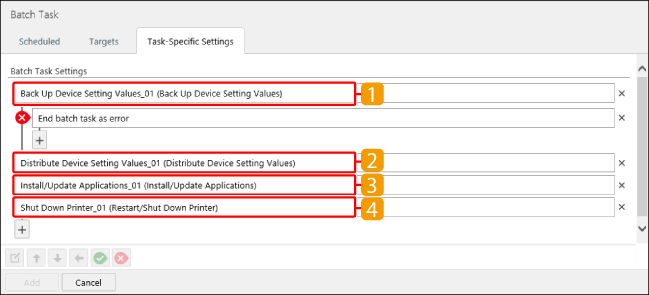
Subtasks  to
to  are executed in order for devices for which subtask
  ended without an error. The result of the last task executed is displayed as the execution result for the batch task.
to are executed in order for devices for which subtask ended without an error. The result of the last task executed is displayed as the execution result for the batch task.Subtasks to are not executed for devices for which subtask ended with an error. "Error" is displayed as the execution result for the batch task.
to are not executed for devices for which subtask ended with an error. "Error" is displayed as the execution result for the batch task.Editing a subtask
In the [Batch Task Settings], select the subtask to edit.
Click [ ] (Edit task) on the bottom of the screen.
] (Edit task) on the bottom of the screen.In [Edit Subtask], edit the name and settings.
Click [Save].
Deleting a subtask
In [Batch Task Settings], click [ ] (Delete) next to the subtask to delete.
] (Delete) next to the subtask to delete.7.
Click [Add].
You can check the information of the registered tasks by selecting the [Tasks] menu > [Task List].
For details, see the following.
You can check the status of executing or completed tasks by selecting the [Tasks] menu > [History].
For details, see the following.