Checking the Task Execution Results
This section describes the method for checking the task execution result.
You can check the execution result of each target device or Agent.
You can also re-execute a task that ends due to an error or times out.
1.
Select the [Tasks] menu > [History].
2.
Perform the required operations in the list on the [Task History] page.
NOTE |
The execution results of the following built-in tasks are not displayed in the list. Monitor Printers Retrieve Printer Information Retrieve Counter Information |
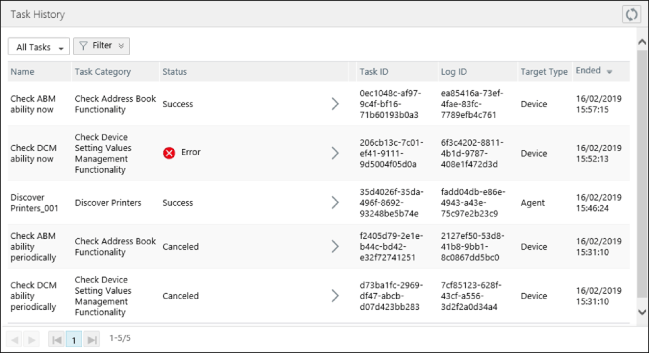
Operations Available on the Top of the List
[  ] (Refresh) ] (Refresh) | Refreshes the list with the latest information. |
Drop-down list | Select [Created Tasks Only] to display only user-defined tasks. Select [All Tasks] to display all tasks, including built-in tasks. |
[Filter] | You can filter the displayed tasks using [Name], [Task Category], and [Status]. |
Canceling tasks
Tasks created by a user that are executing or have not yet been executed can be canceled.
NOTE |
For batch tasks, some subtasks may be executed, depending on when the task is canceled. |
Click [Cancel] displayed for the target task.
Confirm the displayed message, and click [Yes].
Checking the detailed execution history
Click the status of the target task in the list.
On the [Task Result Details] page, you can click the tab to switch the display.
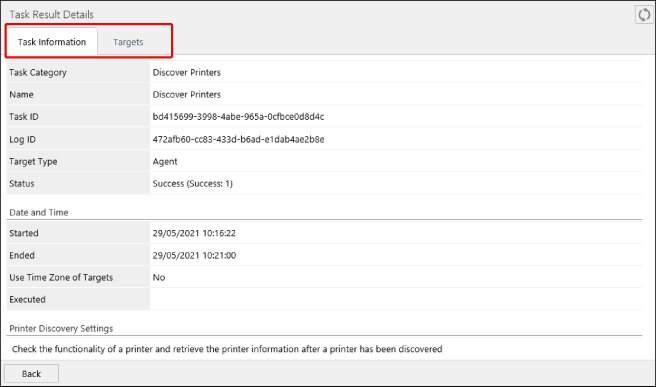
[Task Information] tab | Displays the information regarding the entire task. |
[Targets] tab | Displays the history for each target device or Agent. You can click the status in the list to check the detailed execution results for each target on the [Target Details] page. For batch tasks, [Status] displays the execution result of the final subtask that was executed. Therefore, even if "Success" is displayed for [Status] for a batch task, the subtasks executed before the final subtask may have ended with an error. The execution results for each subtask of a batch task are displayed in [Task List] on the [Target Details] page, as indicated below. With icon [  ]: Success ]: Success[  ]: Error ]: Error[  ]: Timeout ]: Timeout[  ]: Executing ]: ExecutingWithout icon White background: Pending Gray background: Canceling |
[Export] | Outputs a report on the task execution results to a file. Displayed when devices are the execution target of the task. |
Re-executing a task that ends due to an error or times out
When [Error] or [Timeout] is displayed for [Status] for a task created by a user, a recovery task can be created to execute the task again.
NOTE |
Devices and Agents that failed task execution are the target of a recovery task. |
Click [Recover] displayed for the target task.

On the details page for the task, edit the information as required.
For details, see the following.
Click [Add].
You can check the information of the registered tasks by selecting the [Tasks] menu > [Task List].
For details, see the following.
You can check the status of executing or completed tasks by selecting the [Tasks] menu > [History].
It may take some time for the task to finish.