
Placing Originals
Place your originals on the platen glass or in the feeder. For originals such as books and thick/thin paper which cannot be loaded in the feeder, place the original on the platen glass. If you want to scan 2-sided originals or continue to scan several sheets of originals, place them in the feeder. For information on loadable sizes, etc., see Main Unit and 2-Sided Single Pass Feeder.
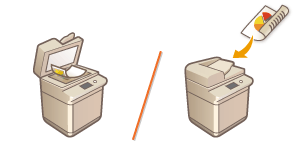
| |||
Use originals that are completely dryWhen placing originals, make sure that any glue, ink, or correction fluid on the originals has completely dried. To avoid paper jamsThe use of stiff or elastic paper may result in paper jams in some operating environments. Such paper should be loosened up slightly before being loaded. Do not place the following types of originals in the feeder as this may cause paper jams:
|
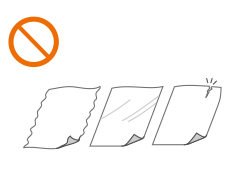
 |
To scan originals more accuratelyOriginals placed in the feeder are scanned while being fed into the machine. On the other hand, originals placed on the platen glass remain in a fixed position while they are scanned. To ensure more accurate scanning results, placing originals on the platen glass is recommended. |
Placing Originals on the Platen Glass
1
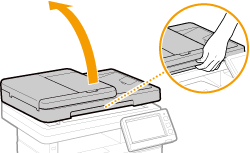
Open the feeder.
2
Place the original face down on the platen glass.
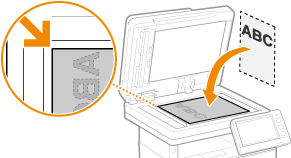
Align the corner of the original with the top-left corner of the platen glass, and place the original so that the top and the bottom are properly positioned, as shown in the following illustrations.
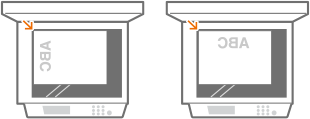
3
Gently close the feeder.
The original is ready for scanning.
Before starting the scanning, specify the paper size and scanning size to match the size of the original.
When scanning is complete, remove the original from the platen glass.
 |
When closing the feeder, take care that your eyes are not exposed to light emitted through the platen glass. |
|
If a thick original such as a book or magazine is placed on the platen glass, do not press down hard on the feeder. |
Placing Originals in the Feeder
1
Open the original supply tray.
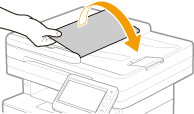
2
Align the slide guides to fit the size of your originals.
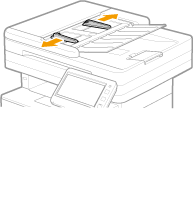
3
Fan the original stack and align the edges.
Fan the original stack in small batches, and align the edges by lightly tapping the stack on a flat surface a few times.

4
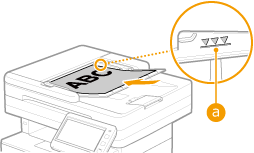
Place the originals face up and as far into the feeder as they will go.
Place the original(s) in the landscape orientation.
Make sure that the original stack does not exceed the load limit line ( ).
).
).

Do not load originals of various sizes at the same time.
If originals are loaded so that they exceed the load limit line, scanning may stop or a paper jam may occur.
5
Align the slide guides against the edges of the original.
Slide the slide guides inward until they are aligned securely against the edges of the original.
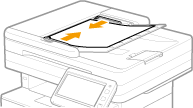
The machine is ready to scan the original.
Align the slide guides securely against the edges of the original
Slide guides that are too loose or too tight can cause misfeeds or paper jam.
While originals are being scanned
Do not add or remove originals.
When scanning is complete
Remove the scanned originals from beneath the feeder to prevent paper jams.