Customizing the [Home] Screen
You can rearrange the items on the [Home] screen so that you can operate frequently used items more quickly.
1

2
Use  or
or  to select the item you want to move, and then press
  .
.
or to select the item you want to move, and then press .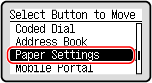
3
Use or to move the item, and then press .
or to move the item, and then press .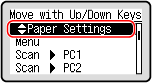
4
Press .
.The display order of the items on the [Home] screen is changed.