[Home] Screen
This screen appears immediately after the power is turned ON and the startup screen closes.
The status of the machine is displayed at the top and bottom of the screen for quick viewing and operations, as needed.
The status of the machine is displayed at the top and bottom of the screen for quick viewing and operations, as needed.
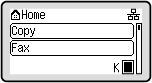
Status of the Machine
[ ]/[
]/[ ]
]
When connected to a wired LAN, [] is displayed. When connected to a Wi-Fi, [] is displayed.
]/[]When connected to a wired LAN, [
] is displayed. When connected to a Wi-Fi, [] is displayed.[ ]
]
Displays the remaining amount of toner in the toner cartridge.
]Displays the remaining amount of toner in the toner cartridge.
Function and Setting Buttons
[Status Monitor]
You can check the information of the machine, usage and logs, network settings, and error information. [Status Monitor] Screen
* This button is not displayed depending on the model.
You can check the information of the machine, usage and logs, network settings, and error information. [Status Monitor] Screen
* This button is not displayed depending on the model.
[Scan  PC1] and [Scan PC2]
Scan using the settings registered beforehand. Scanning Using the Shortcut Key
PC1] and [Scan PC2]Scan using the settings registered beforehand. Scanning Using the Shortcut Key
[Paper Save Copy]
Copies 2-page or 4-page originals so that they fit onto a single sheet of paper. Using Paper Save Copy
Copies 2-page or 4-page originals so that they fit onto a single sheet of paper. Using Paper Save Copy
[Passport Copy]
Copies multiple passports onto one sheet of paper. Copying Multiple Passports onto One Sheet
Copies multiple passports onto one sheet of paper. Copying Multiple Passports onto One Sheet
[One-Touch 1] to [One-Touch 4]
Register and recall frequently used destinations. Address Book Function
Register and recall frequently used destinations. Address Book Function
[Coded Dial]
Enter a 3-digit number to recall the destination registered to that coded number. Address Book Function
Enter a 3-digit number to recall the destination registered to that coded number. Address Book Function
[Address Book]
Register destinations when sending faxes. You can specify destinations from the Address Book, and call up the send function.
Registering Destinations (Address Book)
Specifying Destinations
Register destinations when sending faxes. You can specify destinations from the Address Book, and call up the send function.
Registering Destinations (Address Book)
Specifying Destinations
[Paper Settings]
Set the paper size and type to use, and register frequently used paper. Specifying the Paper Size and Type
Set the paper size and type to use, and register frequently used paper. Specifying the Paper Size and Type
[Display Order (Home)]
You can change the display order of the items on the [Home] screen. Customizing the [Home] Screen
You can change the display order of the items on the [Home] screen. Customizing the [Home] Screen
[Wi-Fi Settings]
Connects a computer to the machine via a Wi-Fi router (access point). Connecting to a Wi-Fi by Searching for a Router (Access Point Setup Method)
Connects a computer to the machine via a Wi-Fi router (access point). Connecting to a Wi-Fi by Searching for a Router (Access Point Setup Method)
[Toner Delivery Set.]
You can configure settings for toner replenishment service. Use of the toner replenishment service requires prior registration with select retailers. This service is only available in certain countries.
You can configure settings for toner replenishment service. Use of the toner replenishment service requires prior registration with select retailers. This service is only available in certain countries.
[Help]
Displays the QR code or URL that allows you to access the manual of the machine. Using Help
Displays the QR code or URL that allows you to access the manual of the machine. Using Help