Registering Non-standard Size Paper (Custom Paper)
Custom paper is non-standard size paper whose side lengths can be freely defined within the range supported by the machine.
You can register sizes when frequently using specific non-standard size paper. You can call up the paper on the size input screen, saving you the trouble of entering the size.
You can register up to three custom sizes.
You can register sizes when frequently using specific non-standard size paper. You can call up the paper on the size input screen, saving you the trouble of entering the size.
You can register up to three custom sizes.
This section describes how to register the settings using the control panel.
You can also register the settings using Remote UI from a computer. Managing the Machine from a Computer (Remote UI)
You can also register the settings using Remote UI from a computer. Managing the Machine from a Computer (Remote UI)
1
On the control panel, select [Paper Settings] in the [Home] screen, and press  . [Home] Screen
. [Home] Screen2
Select [Register Custom Paper], and press .
.The [Register Custom Paper] screen is displayed.
3
Select the registration number, and press .
.If you have selected the registered number, continue on to select [Edit], and press .
.4
Press [X]  enter the values in [X] .
enter the values in [X] .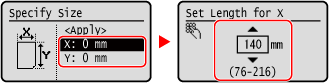
5
Enter the values in [Y] in the same way as [X].
6
Select [<Apply>], and press .
.7
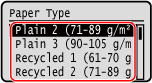
Select the type of the paper, and press .
.
The custom paper is registered.