Connecting to a Wi-Fi by Entering a PIN Code (WPS PIN Code Mode)
When the Wi-Fi router supports WPS PIN code mode, you can establish a connection by registering a PIN code generated on the machine to the Wi-Fi router. Use a computer to register the PIN code.
Administrator privileges are required to connect to a Wi-Fi.
Required Preparations |
Access the Wi-Fi router from a computer, and enable registration of a WPS PIN code. * For details on how to register a WPS PIN code, see the manual of your Wi-Fi router. |
1
On the control panel, select [Wi-Fi Settings] in the [Home] screen and press  . [Home] Screen
. [Home] ScreenThe [Select Network] screen is displayed.
If the login screen appears, enter the Administrator ID and PIN, and then press[<Log In>  . Administrator ID and PIN
. Administrator ID and PINIf the message [Do you want to enable Wi-Fi?] appears, select [Yes] and press .
.If the message [Cannot find any access point.] appears, press [Close] .
.2
Select [Other Connections] and press .
.3
Select [WPS PIN Code Mode] and press .
.A PIN code is generated.
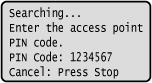
Once this screen is displayed, you must register the WPS PIN code to the Wi-Fi router within 10 minutes.
4
Access the Wi-Fi router from a computer, and register the WPS PIN code to the router.
5
When [Connected.] appears on the control panel, press .
.When the machine is connected to the Wi-Fi, [ ] appears on the [Home] screen.
] appears on the [Home] screen.6
Wait a few minutes.
Wait a few minutes. By default, an IP address is set automatically.
To use a specific IP address, set this manually.
Setting IPv4 Addresses
Setting IPv6 Addresses
To use a specific IP address, set this manually.
Setting IPv4 Addresses
Setting IPv6 Addresses
 |
If an Error Message Appears during Operation and a Connection Cannot Be EstablishedPress , and repeat the procedure starting from Step 2. |