Connecting a Mobile Device Directly to the Machine (Direct Connection)
Connect a mobile device directly to the machine via Wi-Fi. You can directly connect it to the machine without using Wi-Fi router. You must manually connect the mobile device each time you use the machine.
By default, only one mobile device can be directly connected to the machine at any one time. Setting a fixed SSID and network key enables you to connect up to five mobile devices at the same time.
By default, only one mobile device can be directly connected to the machine at any one time. Setting a fixed SSID and network key enables you to connect up to five mobile devices at the same time.
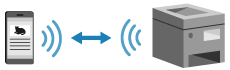
To establish a direct connection, you must use the control panel to put the machine into waiting state and then connect it using the following method:
Manually Configuring the Wi-Fi Settings
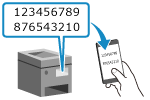 | Search for the machine on the mobile device, and enter the network key manually to connect. |
Scanning QR Codes with Canon PRINT
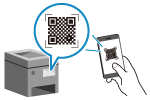 | Use Canon PRINT to easily connect by simply scanning the QR code displayed on the screen of the machine with a mobile device. |
Required Preparations |
Make preparations such as enabling the Direct Connection function on the machine. Preparations for Direct Connection To connect by scanning the QR code, install Canon PRINT on the mobile device. |
1
On the control panel, select [Menu] in the [Home] screen, and press  . [Home] Screen
. [Home] Screen2
Press [Mobile Portal]  .
.
.3
Select [<Connect>] and press .
.The machine enters waiting state for Direct Connection.
Within 5 minutes of pressing [<Connect>], you must directly connect the mobile device.
You can skip this step when [Connect from device you want to connect.] is displayed. Press and proceed to Step 3.
and proceed to Step 3.When [Maximum number of wireless devices connected using Direct Connection has been reached.] is displayed, you cannot connect a new mobile device until a connected mobile device is disconnected. To disconnect a connected mobile device, press [<Disconnect>] .
* By default, only one mobile device can be directly connected to the machine at any one time.
[<Disconnect>] .* By default, only one mobile device can be directly connected to the machine at any one time.
4
Directly connect the mobile device.
 Manually Configuring the Wi-Fi Settings
1 | Press [Display SSID/Network Key] , check the SSID and network key of the machine. |
2 | In the Wi-Fi settings of the mobile device, select the SSID of the machine, and enter the network key. The [Mobile Portal] screen reappears. By default, only one mobile device can be directly connected to the machine at any one time. [Maximum number of wireless devices connected using Direct Connection has been reached.] is displayed on the screen. For details about how to configure the Wi-Fi settings, see the manual of the mobile device. |
Scanning QR Codes with Canon PRINT
1 | Press [Display QR Code] .A QR code is displayed. |
2 | On the mobile device, start Canon PRINT, and scan the QR code. The [Mobile Portal] screen reappears. By default, only one mobile device can be directly connected to the machine at any one time. [Maximum number of wireless devices connected using Direct Connection has been reached.] is displayed on the screen. For details about scanning a QR code, see Help in Canon PRINT. |
5
When you have completed your operations on the mobile device, press [<Disconnect>] .
.The direct connection is terminated.
If multiple mobile devices are connected, all devices are disconnected.
If multiple mobile devices are connected, all devices are disconnected.
 |
You may not be able to connect to the Internet with Direct Connection depending on the mobile device. The power-saving effect of sleep mode decreases when using Direct Connection. The IP address of the mobile device is set automatically. If you set the IP address manually, communication using Direct Connection may not be performed correctly. |
 |
Checking a Mobile Device Connected to the MachineWhen using Direct Connection, press [Connection Information] to display the information of the mobile device connected to the machine with Direct Connection. If the Direct Connection Is Automatically DisconnectedThe direct connection is automatically terminated in the following cases: When the Direct Connection Termination is set When no data is sent or received between the mobile device and the machine for a while When you are using the machine via a Wi-Fi connection and the connection drops out |