Numeric Keypad
To use the hard keys to operate the control panel instead of the on-screen buttons, install the optional Numeric Keypad.
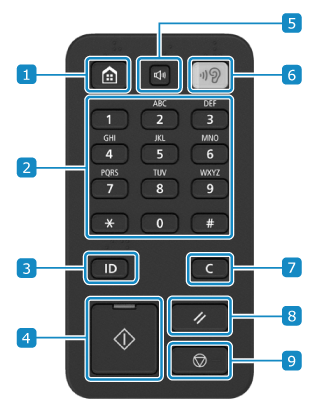
 Home key
Press to display the [Home] screen. [Home] Screen
 Numeric Keypad
Enter a number.
 Log In/Out key
Log in when user authentication is required. When you have completed your operations, press this key again to log out. Logging In to the Machine
 Start key
Starts scanning or copying of the original.
 Volume Settings key
Adjusts the volume.
 Voice Navigation key
This key cannot be used.
 Clear key
Clears entered characters and numbers.
 Reset key
Resets the changed settings.
 Stop key
Cancels an operation being executed.