Cleaning the Platen Glass
Regularly clean the platen glass and underside of the feeder to prevent originals from becoming dirty and printouts from appearing to be smudged.
If the platen glass or underside of the feeder is dirty, originals can become dirty and paper can become smudged after scanning, copying, or sending faxes.
If the platen glass or underside of the feeder is dirty, originals can become dirty and paper can become smudged after scanning, copying, or sending faxes.
1
Turn OFF the power and remove the power cord from the outlet. Turning OFF the Machine
Check the operation status of the machine before turning it OFF. Turning OFF the machine during an operation may cancel the operation or result in data corruption or damage.
Before removing the power plug, confirm that the touch panel display and indicators have been off for three seconds or longer.
2
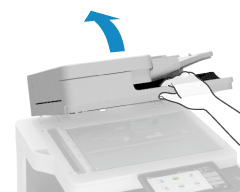
Open the feeder.
3
Wipe the platen glass and underside of the feeder.
1
Wipe the platen glass.
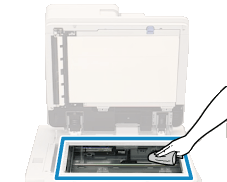
Use the supplied glass cleaning cloth to wipe. If the glass cleaning cloth is dirty, rinse it and allow it to dry before wiping.
2
Wipe the underside of the feeder.
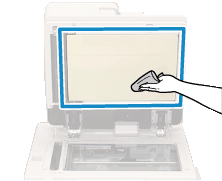
Wipe with a soft cloth soaked in water and wrung out. Next, wipe with a soft, dry cloth.
If Still Dirty
Wipe with a soft cloth soaked in diluted neutral detergent and wrung out. Next, wipe with a soft, dry cloth.
4
Gently close the feeder.
5
Plug the power cord into the outlet, and turn ON the machine. Turning ON the Machine