Cleaning the Feeder
If the following symptoms occur when using the feeder, wipe clean the feeder: Originals become dirty Originals frequently jam Printouts appear smudged after scanning or copying If you do not see an improvement after wiping the feeder, use paper to perform cleaning. |
 |
Notification that the Document Feed Scanning Area Is Dirty You can configure the machine to display a message on the control panel screen to notify you when the original scanning area is dirty and needs to be cleaned. [Notify to Clean Orig. Scan Area] |
Cleaning the Feeder by Wiping
Wipe the rollers inside the feeder and the feeder original scanning area to remove any adhering graphite powder and dust.
1
Turn OFF the power and remove the power cord from the outlet. Turning OFF the Machine
Turning OFF the machine deletes any data waiting to be printed.
2
Pull the lever, and open the feeder cover.
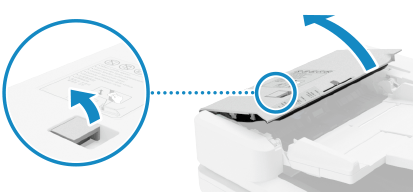
3
Wipe the rollers ( ) inside the feeder and surrounding areas.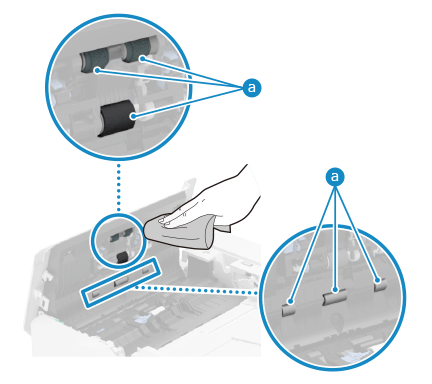
Wipe with a cloth soaked in water and wrung out. Next, wipe with a soft, dry cloth.
4
Clean the inside of the separation guide of the feeder.
1 | Open the separation guide of the feeder. 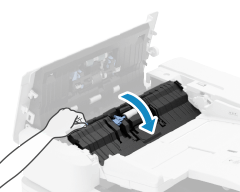 |
2 | Wipe the thin glass part and white plate part  . 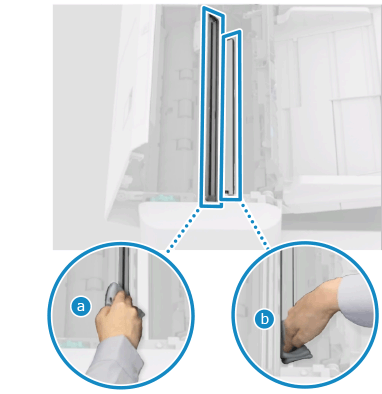 Wipe with a cloth soaked in water and wrung out. Next, wipe with a soft, dry cloth. |
5
Close the separation guide and feeder cover.
6
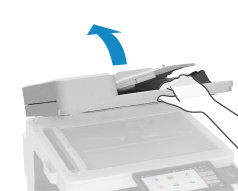
Open the feeder.
7
Wipe the feeder original scanning area.
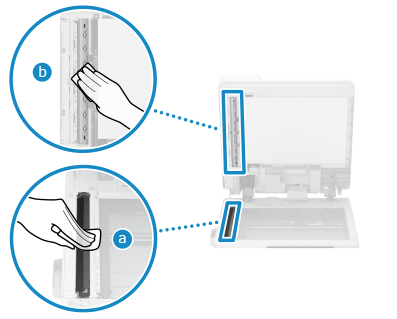
Wipe with a cloth soaked in water and wrung out. Next, wipe with a soft, dry cloth.
8
Allow the parts to fully dry.
9
Gently close the feeder cover.
10
Plug the power cord into the outlet, and turn ON the machine. Turning ON the Machine
Cleaning the Feeder with Paper
Clean the feeder by running paper through the inside.
1
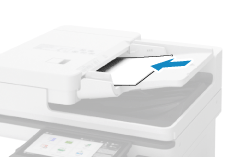
Load 10 sheets of A4 or letter size plain paper into the feeder. Placing Originals
2
On the control panel, press [Menu] in the [Home] screen. [Home] Screen
3
Press [Adjustment/Maintenance]  [Maintenance] [Clean Feeder].
The [Clean Feeder] screen is displayed.
4
Press [Start].
The paper loaded in the feeder is fed to the machine, and cleaning starts.
The paper is output when cleaning is completed.
The paper is output when cleaning is completed.