
2-Sided Single Pass Feeder (Single Pass DADF-G)
This section describes the name and use of each part of the feeder.
Single Pass DADF-G is optional.
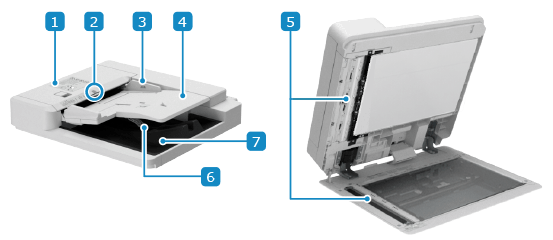
 Feeder cover
Open the feeder cover when cleaning the inside of the feeder or clearing a paper jam inside the feeder.
 Original set indicator
Lights up when the original is placed on the original supply tray.
 Slide guides
Align the slide guides against the edges of the originals to properly place the original.
 Original supply tray
You can place several sheets of originals in the feeder. Placing Originals
 Document feed scanning area
Originals placed on the feeder are scanned.
 Original retainer
Lower this part to output the original neatly.
 Original output tray
Scanned originals are output to the original output tray.
|
If a thick original such as a book or magazine is placed on the platen glass, do not press down hard on the feeder. Do not place any objects in the original output area. Doing so may cause damage to the originals. Regularly clean the feeder and platen glass in order to obtain proper print results. Cleaning the Machine |
 |
If the following symptoms occur when using the feeder, clean the feeder: Cleaning the Feeder Originals become dirty Originals frequently jam Printouts appear smudged after scanning or copying |