
Replacing the Waste Toner Container
When the waste toner container is almost full or completely full, a message is displayed prompting you to prepare a new waste toner container or perform waste toner container replacement. Prepare a new waste toner container or perform waste toner container replacement according to the displayed message.
Cautions When Replacing the Waste Toner Container
|
Do not touch the contacts (  ) inside the machine. Doing so may result in damage to the machine. ) inside the machine. Doing so may result in damage to the machine.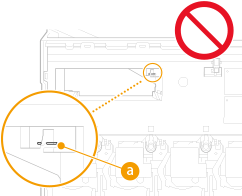 |
 |
Do not replace the waste toner container before the message prompting you to replace it appears on the touch panel display. |
 |
The waste toner container is a container for collecting unused toner that remains when printing. For details about each message, see Countermeasures for Each Message. For information on the model number of the waste toner container, see Consumables. You can check the current amount of space remaining in the waste toner container. Checking the Space Remaining in the Waste Toner Container |
Procedure for Replacing the Waste Toner Container
When replacing the waste toner container, the procedure is also displayed on the screen. Check the information displayed on the screen in addition to the following procedure.
1
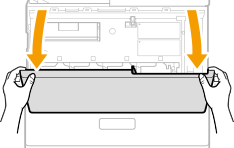
Open the front cover.
Open the cover while holding the both sides.
2
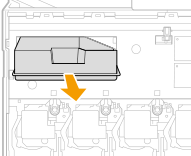
Hold the handle and pull out the waste toner container halfway.
3
Lift the the waste toner container slightly upwards and pull it straight out while being careful not to spill the toner inside.
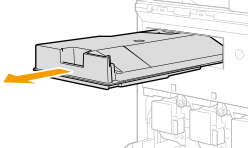

Prepare a piece of paper or cloth that can get dirty, and temporarily place the removed waste toner container on it.
4
Remove the new waste toner container from the box.
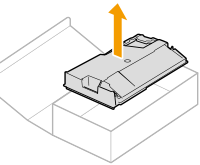
Do not disassemble or modify the waste toner container.
5
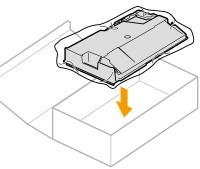
Wrap the used waste toner container in the bag and place it in the box.
The bag is in the box of the new waste toner container.
After wrapping the waste toner container in the bag, twist close the opening of the bag and place it in the box so the toner does not spill.
6
Install the new waste toner container.
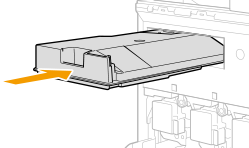
Firmly push it in as far as it will go. If the waste toner container is not pushed all the way in, toner may scatter when the waste toner container is removed.
7
Close the front cover.