
Paper Jams in a Paper Source
Check the paper jam location on the screen, and follow the procedure below to remove the paper.
|
Confirm before handlingBefore starting the operation to clear paper jams, confirm that the covers and paper drawers of the machine and optional equipment are closed. |
Clearing Paper Jams in Paper Drawers 1
1
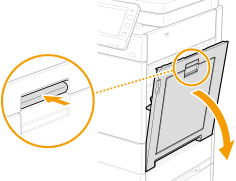
Push the lever and open the right cover of the main unit.
2
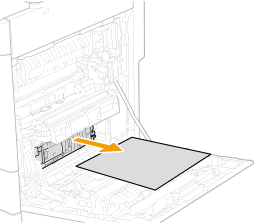
If paper is jammed, gently pull it out in the direction of the arrow.
3
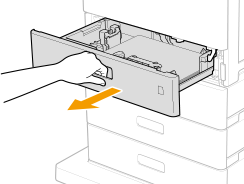
Pull out the paper drawer 1 until it stops.
4
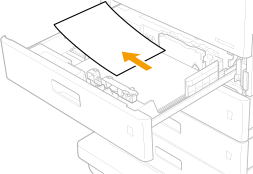
If paper is jammed inside paper drawer 1, gently pull it out in the direction of the arrow.
5
Set the paper drawer 1.
6
Close the right cover of the main unit.

When the message is still displayed
Paper may be jammed in other locations. Check other locations, and remove jammed paper if any. If the message is still displayed, check whether the right cover of the main unit is securely closed.
Clearing Paper Jams in Paper Drawers 2, 3 and 4 (Optional)
|
Remove jammed paper in Paper Drawers 3 and 4 with the same procedure as Paper Drawer 2. |
1
Check whether paper is jammed inside the right cover of the paper drawer.
1 | Open the right cover of the paper drawer. 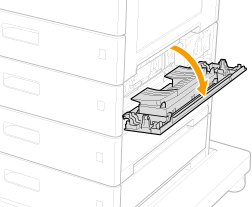 |
2 | If paper is jammed, gently pull it out in the direction of the arrow. 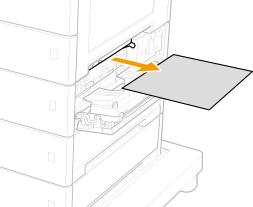 |
2
Check whether paper is jammed inside the paper drawer.
1 | Pull out the paper drawer toward you. 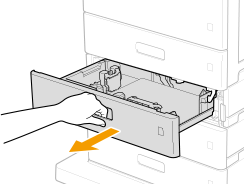 |
2 | If paper is jammed, gently pull it out in the direction of the arrow. 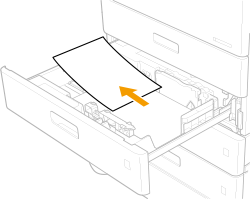 |
3
Set the paper drawer.
4
Close the right cover of the paper drawer.
When the message is still displayed
Paper may be jammed in other locations. Check other locations, and remove jammed paper if any. If the message is still displayed, check whether the right cover of the paper drawer is securely closed.