Configuring the Built-in Tasks
This section describes the procedure for setting the interval for retrieving printer information.
1.
Select the [Tasks] menu > [Built-In Tasks].
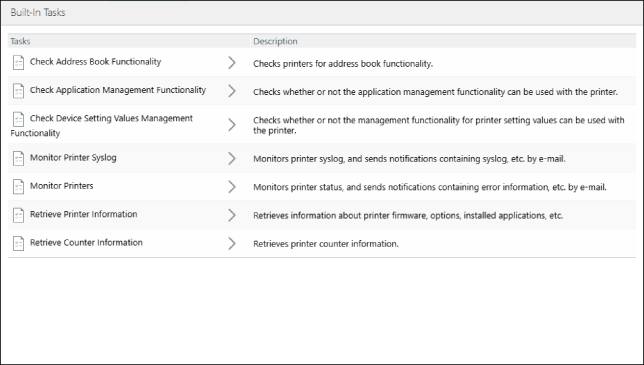
[Monitor Printer Syslog]
Select [Monitor Printer Syslog] from the list.
Click [Create].
Configure [Edit Settings], then click [Create].
NOTE |
For details, see the following. |
[Monitor Printers]
Select [Monitor Printers] from the list.
On the [Monitoring Settings] tab, set the interval for retrieving the printer status, and click [Apply].
NOTE |
For details, see the following. |
[Retrieve Printer Information]
Select [Retrieve Printer Information] in the list.
To register the device name and installation location registered in a printer to this software, select the [Rewrite the device name and location with information obtained from the printer] check box.
If you do not select this check box, the device name and installation location registered in this software are set for the printer. If the device name and installation location are not registered in this software, the printer settings will be blank.
Configure [Task Execution] for retrieving the printer information, and click [Apply].
Click [Execute Now] to execute immediately.
[Retrieve Counter Information]
Select [Retrieve Counter Information] from the list.
Set the interval for retrieving the counter information, and click [Apply].