Registering/Editing One-Touch Buttons
If you are using the imageRUNNER ADVANCE C350i/C250i, optional products are required to use the Fax function. For information on the optional products required to use the Fax function, see "Optional Products Required for Each Function."
|
NOTE
|
|
You cannot register a new destination in a group destination that is stored in a one-touch button. The destination must be registered in a one-touch button in advance.
|
1.
Press  (Settings/Registration).
(Settings/Registration).2.
Press [Set Destination] → [Register One-Touch].
3.
Select a one-touch button to register or change → press [Register/Edit].
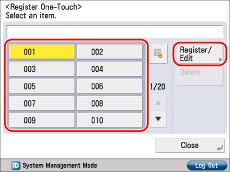
If you know the one-touch button's three digit number, press  → enter the three digit number of the desired one-touch button using
  -
-  (numeric keys).
→ enter the three digit number of the desired one-touch button using - (numeric keys).If you select a one-touch button already storing a destination, proceed to step 4.
|
NOTE
|
|
The following icons are displayed to indicate the stored destination type for one-touch buttons in which a destination is already stored:
 : E-Mail : E-Mail : Fax : Fax : I-Fax : I-Fax : File : File : Group : GroupIf you register multiple destinations as a group address in a one-touch button, the number of destinations registered in the group address appears.
|
4.
Select the type of destination to register.
If you select [E-Mail]:
Press [E-Mail].
Enter a name for the address [Name] in accordance with steps 5 and 6 of "Registering an E-Mail Address."
Press [One-Touch Name].
Enter a name for the one-touch button → press [OK] → [Next].
Specify the e-mail address and Divided Data settings in accordance with steps 7 to 10 of "Registering an E-Mail Address."
If you select [Fax]:
Press [Fax].
Enter [Name] for the recipient of the fax in accordance with steps 5 to 7 of "Registering a Fax Number."
Press [One-Touch Name].
Enter a name for the one-touch button → press [OK] → [Next].
Enter the fax number for the destination in accordance with step 8 of "Registering a Fax Number."
If you select [I-Fax]:
Press [I-Fax].
Enter [Name] for the recipient of the I-fax in accordance with steps 5 and 6 of "Registering an I-Fax Address."
Press [One-Touch Name].
Enter a name for the one-touch button → press [OK] → [Next].
Specify the I-fax mode, I-fax address, standard fields, send via server setting, and destination conditions in accordance with steps 8 to 14 of "Registering an I-Fax Address."
If you select [File]:
Press [File].
Enter [Name] for the file server in accordance with steps 5 and 6 of "Registering a File Server Address."
Press [One-Touch Name].
Enter a name for the one-touch button → press [OK].
Specify the protocol, host name, folder path, user, and password in accordance with steps 8 to 16 of "Registering a File Server Address."
If you select [Group]:
Press [Group].
Enter [Name] for the group in accordance with steps 5 and 6 of "Registering a Group Address."
Press [One-Touch Name].
Enter a name for the one-touch button → press [OK] → [Next].
Select a destination to store in the group address from [Add from One-Touch] → press [OK].
Only destinations that are already stored in one-touch buttons can be selected as part of a one-touch button group address.
If you know the one-touch button's three digit number, press → enter the three digit number of the desired one-touch button using - (numeric keys).
→ enter the three digit number of the desired one-touch button using - (numeric keys).If you select [Register from LDAP Server]:
Press [Register from LDAP Server].
Search destinations in accordance with steps 4 to 11 of "Addresses Obtained via a Server."
Select the destination that you want to store in the one-touch button from the search results → press [Next].
You cannot select multiple destinations at the same time.
You can register the selected e-mail address as an I-fax address by pressing <Register E-Mail as I-Fax>. To register e-mail addresses as I-fax addresses, register one e-mail address at a time.
If you are using the imageRUNNER ADVANCE C351iF, or the imageRUNNER ADVANCE C350i/C250i with the Fax function, you can restrict the type of destinations displayed in the results list by selecting the desired type of destination from the drop-down list.
|
NOTE
|
|
To cancel a selected destination, select the destination again.
|
If necessary, edit the contents of the destination.
Press [One-Touch Name].
Enter a name for the one-touch button → press [OK] → [Next].
|
IMPORTANT
|
|
The information that can be obtained through the LDAP server varies, depending on the installed or activated options, as follows:
If you are using the imageRUNNER ADVANCE C350i/C250i and the Fax function is not available for use: names and e-mail addresses
If you are using the imageRUNNER ADVANCE C351iF, or the imageRUNNER ADVANCE C350i/C250i with the Fax function: names, e-mail addresses, and fax numbers
|
5.
Press [OK] → [Close].
|
IMPORTANT
|
|
If you set [Language/Keyboard Switch] to 'On' in [Preferences] (Settings/Registration), the host name and folder path of the file server destination may not be displayed correctly, and you may not be able to browse to them.
|
|
NOTE
|
|
Destinations stored in one-touch buttons also appear in the Local Address Book.
You can register e-mail, I-fax, file server, and group destinations.
If you are using the imageRUNNER ADVANCE C351iF, or the imageRUNNER ADVANCE C350i/C250i with the Fax function, you can register fax numbers and group addresses which contain fax destinations in the Address Book.
|