Specify whether to print the Receive Results report automatically.
The report includes the following information:
Receive Results Report
Job No.
Address
Name
Start time
Call length
Sheets
Result
OK
Transmission finished successfully.
Transmission finished successfully.
NG
Transmission failed.
Transmission failed.
If an error code is displayed, see the following.
1
Press [ ] (Report).
] (Report).2
Press [ ] or [
 ] to highlight <Report Settings>, and then press [OK].
] or [] to highlight <Report Settings>, and then press [OK].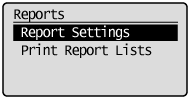
3
Press [] or [] to highlight <RX Result Report>, and then press [OK].
] or [] to highlight <RX Result Report>, and then press [OK].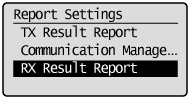
4
Specify how you want to print the report.
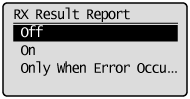
If you want to print the report manually:
|
(1)
|
Press [
] or [] to highlight <Off>, and then press [OK]. |
|
(2)
|
Proceed to step 5.
|
If you want to print the report every time you receive a document:
|
(1)
|
Press [
] or [] to highlight <On>, and then press [OK]. |
|
(2)
|
Proceed to step 5.
|
If you want to print the report only when a receive error occurs:
|
(1)
|
Press [
] or [] to highlight <Only When Error Occurs>, and then press [OK]. |
|
(2)
|
Proceed to step 5.
|
Press [] (Report) to close <Report Settings> screen.
] (Report) to close <Report Settings> screen.