Specifying Destinations
This section describes how to specify fax destinations.
See the following sections to specify destinations:
When you are sending the same fax to multiple destinations simultaneously, see the following.
|
For the instructions on how to send a fax, see "Basic Procedures for Sending Faxes."
|
|
NOTE
|
|
If <Method to Specify Dest for TX w/PIN Code> is set to <Do Not Restrict>, you can specify a destination by the one-touch keys, coded dialing codes or address book after entering a PIN code.
|
Specifying Destinations by Entering the Fax Number
Specify the fax number using the numeric keys, [ ] (Tone), and [
 ] (SYMBOLS).
] (Tone), and [] (SYMBOLS).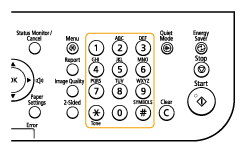
To modify destinations:
To delete the only one character
Press [ ] (Clear).
Press [
] (Clear).To delete the all characters
Press and hold [] (Clear).
Press and hold [
] (Clear).Specifying Destinations with One-Touch Keys
Press the one-touch key (01 to 40) in which the destination is registered.
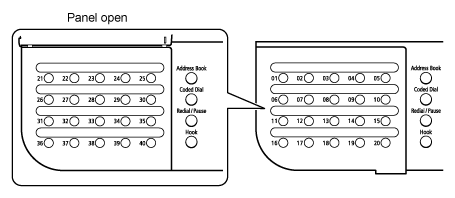
To select a destination from the one-touch keys, you need to register destinations in these keys in advance.
If you press an incorrect key:
|
(1)
|
Press [
] (Clear). |
|
(2)
|
Press [
 ] to highlight <Yes>, and then press [OK]. ] to highlight <Yes>, and then press [OK]. |
 |
To clear all the scan settings specified, press [
 ] (Reset). ] (Reset). |
Specifying Destinations Using Coded Dialing Codes
Press [ ] (Coded Dial), and then enter the three-digit registration number (001 to 200) with the numeric keys.
] (Coded Dial), and then enter the three-digit registration number (001 to 200) with the numeric keys.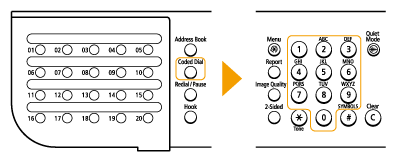
To select a destination from the coded dialing codes, you need to register destinations in these codes in advance.
If you press an incorrect key:
|
(1)
|
Press [
] (Clear). |
|
(2)
|
Press [
] to highlight <Yes>, and then press [OK]. |
|
|
To clear all the scan settings specified, press [
] (Reset). |
Specifying Destinations Using Group Addresses
If group addresses are registered to a one-touch keys:
Press the one-touch key (01 to 40) in which the group address that you want to select is registered.
If group addresses are registered to coded dialing codes:
Press [] (Coded Dial), and then enter the three-digit registration number (001 to 200) with the numeric keys.
] (Coded Dial), and then enter the three-digit registration number (001 to 200) with the numeric keys.To select a destination from the coded dialing codes, you need to register group addresses in these codes in advance.
If you press an incorrect key:
|
(1)
|
Press [
] (Clear). |
|
(2)
|
Press [
] to highlight <Yes>, and then press [OK]. |
|
|
To clear all the scan settings specified, press [
] (Reset). |
Specifying Destinations Using the Address Book
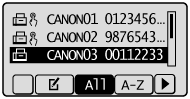
After searching for destinations from the registered address book (one-touch keys, coded dialing, or group dialing), the destinations to be specified appear on the display. You can specify the displayed address as a destination. You can also search for destinations with the initial of the registered destination name.
To select a destination from the address book, you need to register destinations in the address book in advance.
To select a destination from the address book, you need to register destinations in the address book in advance.
1
Press [ ] (FAX/COPY) to switch to the Fax mode screen.
] (FAX/COPY) to switch to the Fax mode screen.2
Press [ ] (Address Book).
] (Address Book).3
Press [] or [ ] to search for your destination.
] or [] to search for your destination.Select <All> to display all destinations.
Select < > at the bottom of the screen to add or edit destinations.
> at the bottom of the screen to add or edit destinations.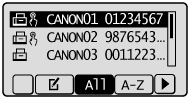
4
Press [ ] or [
 ] to highlight the destination, and then press [OK].
] or [] to highlight the destination, and then press [OK].