Storing/Editing/Deleting One-Touch Buttons
|
NOTE
|
|
You cannot register new destinations in a group destination that is stored in a one-touch button. The destinations must be registered in the one-touch buttons beforehand.
|
Storing/Editing One-Touch Buttons
1.
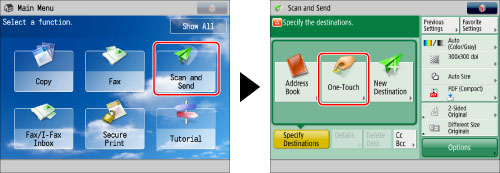
Press [Scan and Send] → [One-Touch].
2.
Press [Register]→ select a one-touch button to store or change → press [Register/Edit].
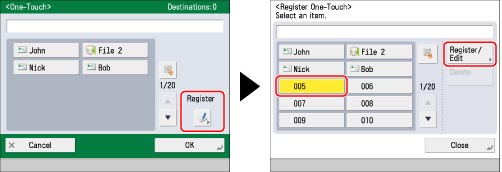
If you know the three digit number for the one-touch button, you can press  → enter the three digit number of the desired one-touch button using
  -
-  (numeric keys).
→ enter the three digit number of the desired one-touch button using - (numeric keys).If you select a one-touch button in which a destination is already stored, proceed to step 3.
|
NOTE
|
|
The following icons are displayed to indicate the stored destination type for one-touch buttons in which a destination is already stored:
 (E-Mail) (E-Mail) (Fax) (Fax) (I-Fax) (I-Fax) (File server) (File server) (Group) (Group) |
3.
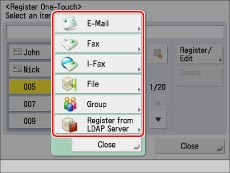
Select the type of destination to register.
|
NOTE
|
|
For instructions on registering a fax number in a one-touch button, see "Storing New Addresses."
|
If you select [E-Mail]:
Press [E-Mail].
Enter a name for the address [Name] in accordance with steps 7 and 8 of "Registering an E-Mail Address."
Press [One-Touch Name].
Enter a name → press [OK].
Press [Next].
Press [E-Mail Address].
Enter the e-mail address → press [OK].
Select one of the following for <Divide Data> as necessary → press [OK].
For details on Divide Data, see "Specifying a Destination by Entering an E-mail Address."
If you select [I-Fax]:
Press [I-Fax].
Enter a name for the address [Name] in accordance with steps 7 and 8 of "Registering an I-Fax Address."
Press [One-Touch Name].
Enter a name → press [OK].
Press [Next].
Specify the I-fax address in accordance with steps 10 to 16 of "Registering an I-Fax Address."
If you select [File]:
Press [File].
Enter a name for the address [Name] in accordance with steps 7 and 8 of "Registering a File Server Address."
Press [One-Touch Name].
Enter a name → press [OK].
Press [Next].
Specify the file server address in accordance with steps 10 to 19 of "Registering a File Server Address."
If you select [Group]:
Press [Group].
Enter a name for the address [Name] in accordance with steps 7 and 8 of "Registering a Group Address."
Press [One-Touch Name].
Enter a name → press [OK].
Press [Next].
Press [Add from One-Touch] → select a destination to store in the group address → press [OK].
You can only select destinations that are already stored in one-touch buttons to be part of a one-touch button group address.
If you know the three digit number for the desired one-touch button, you can press → enter the three digit number of the desired one-touch button using - (numeric keys).
→ enter the three digit number of the desired one-touch button using - (numeric keys).Press [OK].
If you select [Register from LDAP Server]:
Press [Register from LDAP Server].
Specify the address by using LDAP server in accordance with steps 4 to 9 of "Specifying Destinations Using the Address Book (LDAP Server)."
Select the destination from the search results → press [Next].
You cannot select multiple destinations at the same time.
|
NOTE
|
|
To cancel a specified destination, select the destination you want to register again.
|
Press [One-Touch Name].
Enter a name → press [OK].
|
IMPORTANT
|
|
The information that can be obtained via the LDAP server consists of only names and e-mail addresses.
|
Press [OK].
4.
Press [Close] → [OK].
Deleting One-Touch Buttons
1.
Press [Scan and Send] → [One-Touch].
2.
Press [Register] → select the one-touch button to delete → press [Delete].
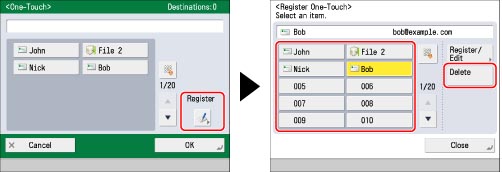
If you know the three digit number for the desired one-touch button, you can press → enter the three digit number of the desired one-touch button using - (numeric keys).
→ enter the three digit number of the desired one-touch button using - (numeric keys).|
NOTE
|
|
The following icons are displayed to indicate the stored destination type for one-touch buttons in which a destination is already stored:
(E-Mail) (Fax) (I-Fax) (File server) (Group) |
3.
Press [Yes].
4.
Press [Close] → [OK].
|
NOTE
|
|
Destinations stored in one-touch buttons also appear in the Local Address Book.
For instructions on registering/editing a fax number, see "Storing New Addresses."
|