
Installation/Settings Problems
See Common Problems also.
|
|
Icons in the description Problem with the wireless LAN connection Problem with the wireless LAN connection Problem with the wired LAN connection Problem with the wired LAN connection Problem with the USB connection Problem with the USB connection |
 The machine cannot be connected to a computer via a wireless LAN, a wired LAN and a USB cable at the same time.


All three connection types cannot be used at the same time. The following can be used at the same time: a USB cable and a wired LAN, or a USB cable and a wireless LAN.
Remote UI is not displayed.
Are <Use HTTP> and <Use Remote UI> set to <On>?
If the machine is connected to a wired LAN, check that the cable is connected firmly and the IP address is set correctly, and then start the Remote UI again.
If the machine is connected to a wireless LAN, check that the settings are specified correctly, and then start the Remote UI again.
A connection to a network cannot be established.
The IP address may not be set correctly. Set the IP address again.
When you connect the machine to a computer via wireless LAN, check whether the machine is properly installed and ready to connect to the network.
You are unsure of the set IP address.
The connection method cannot be switched between a wired LAN and a wireless LAN.
Did you select a wired LAN or a wireless LAN on the operation panel on the machine as well? This selection is required to have the machine switch to your selection.
A fax cannot be sent or received on an optical fiber line.
The machine is compliant with use on analog lines. When using an optical fiber line or IP phone line, the machine may not work correctly depending on the connection environment or connected devices. In such a case, contact the provider of the optical fiber line or IP phone.
You are unsure of the SSID or the network key of the wireless router to be connected. The SSID is not displayed on the screen.
Check whether the SSID can be found on the wireless router or package box.
Check the SSID or the network key of the wireless router by using Canon MF/LBP Wireless Setup Assistant.
The SSID of the wireless router to be connected is not displayed in the access point list.
Check whether the SSID is correct.
If the SSID of the wireless router is hidden (using a stealth mode*), set the SSID to be visible on the wireless router.
|
|
* A mode that disables the SSID auto-detection of other devices.
|
Check whether the machine is properly installed and ready to connect to the network.
The machine dials up to an unintended connection destination (if a dialup router is connected to a network).
If a dialup router does not need to pass broadcast packets, set the dialup router so that the broadcast packets will not pass. If the dialup router needs to pass broadcast packets, check whether the settings are correct.
If a DNS server is located in an external network, set the IP address to be connected, not the host name, even if connecting to the devices that are on the network that is connected to the machine.
If a DNS server is located on a network that is connected to the machine and the information about the devices that are connected to an external network is registered to the DNS server, check whether the settings are correct.
The PC cannot correctly recognize the machine.
When using the machine with a USB connection, be sure to match the machine settings to the OS of the PC.
When the machine cannot connect to the wireless LAN
 |
|
 |
|
Check the status of your computer.
Have the settings of the computer and the wireless router been completed?
Are the cables of the wireless router (including the power cord and LAN cable) correctly plugged in?
Is the wireless router turned on?
If the problem persists even after checking the above:
Turn off the devices, and then turn them on again.
Wait for a while, and try again to connect to the network.
|
 |
||||
 |
 |
Check whether the machine is turned ON.
If the machine is turned ON, turn it OFF, and then turn it back ON.
|
||
|
|
||||
 |
 |
Check the installation site of the machine and the wireless router.
Is the machine too far from the wireless router?
Are there any obstacles such as walls between the machine and the wireless router?
Are there any appliances such as microwave ovens or digital cordless phones that emit radio waves near the machine?
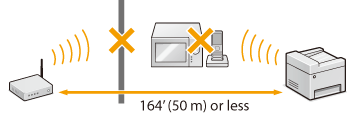 |
||
|
|
||||
 |
 |
Perform one of the following settings again.
|
|
|
||
When you need to manually set up the connectionIf the wireless router is set as described below, manually enter all the required information for the wireless LAN connection (Setting Up Connection by Specifying Detailed Settings).
ANY connection refusal* is activated.
The WEP key that was automatically generated (hexadecimal) is selected.
When you need to change the settings of the wireless routerIf the wireless router is set as described below, change the settings of the router.
The MAC address packet filtering is set.
When only IEEE 802.11n is used for the wireless communication, WEP is selected or the WPA/WPA2 encryption method is set to TKIP.
The stealth mode is activated.
|