
Viewing Network Settings
|
|
|
The IP address is not correctly configured if it is displayed as "0.0.0.0".
Connecting the machine to a switching hub or bridge may result in a connection failure even when the IP address is correctly configured. This problem can be solved by setting a certain interval before the machine starts communicating. Setting a Wait Time for Connecting to a Network
You can print a list of the current network settings. User Data List/System Manager Data List
|
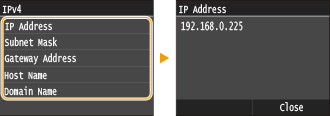
Viewing IPv4 Settings

 <Network Information> <IPv4> Select the setting to view Check the settings
Viewing IPv6 Settings
<Network Information> <IPv6> Select the setting to view Check the settings 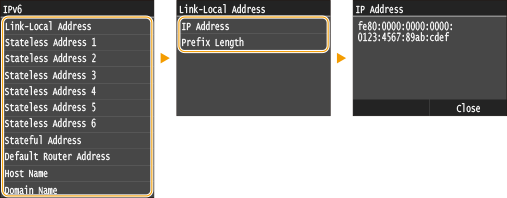
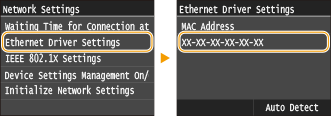
Viewing the MAC Address for Wired LAN
1
Tap <Menu> in the <Home> Screen.
2
Tap <Network Settings>.
If the logon screen appears, enter the correct ID and PIN using the numeric keys, and then press  . Logging on to the Machine
. Logging on to the Machine3
Tap <Ethernet Driver Settings>.
Viewing the MAC Address and Information for Wireless LAN
1
Tap <Menu> in the <Home> Screen.
2
Tap <Network Settings>.
If the logon screen appears, enter the correct ID and PIN using the numeric keys, and then press . Logging on to the Machine
. Logging on to the Machine3
Tap <Wireless LAN Settings>.
If the <Do you want to enable the wireless LAN?> message is displayed, tap <Yes>.
4
Read the message that is displayed, and tap <OK>.
5
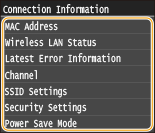
Tap <Connection Information>.
6
Select the setting to view.
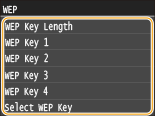
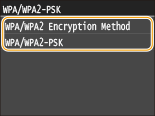
 Viewing WEP and WPA/WPA2-PSK information
|
1
|
Tap <Security Settings>.
|
||||||||
|
2
|
Confirm and tap the current security setting.
If the security settings are not configured, <None> is displayed.
|
||||||||
|
3
|
Select the setting to view.
|

<Wireless LAN Status> and <Latest Error Information> can be viewed from . Press <Network Information> <Network Connection Method> <Connect. Info.> and select the setting to view.
. Press <Network Information> <Network Connection Method> <Connect. Info.> and select the setting to view.