Adding a Secure Watermark
The Secure Watermark mode enables you to embed text in the background of copies. You can embed text such as "CONFIDENTIAL," the date and time, or a department name. The embedded text becomes visible when the copies are copied.
For information on the optional products required to use this function, see "Optional Products Required for Each Function."
1.
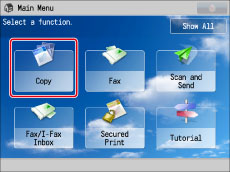
Press [Copy].
2.
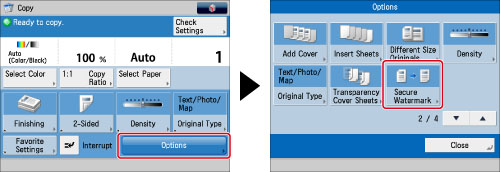
Press [Options] → [Secure Watermark].
3.
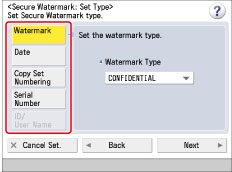
Select the type of page number.
|
NOTE
|
|
[ID/User Name] is grayed out and cannot be selected if you are not using a login service.
|
If you select [Watermark]:
Press [Watermark].
Press the <Watermark Type> drop-down list → select a preset watermark.
If you select [Custom], press [Enter] and enter the custom text → press [OK] → [OK].
You can also select text that has been registered in [Register Characters for Page No./Watermark] in [Function Settings] (Settings/Registration).
Press [Next].
|
IMPORTANT
|
|
Text that you enter in [Custom] is not automatically saved. If you want to register your newly created secure watermark to be selected whenever necessary, press [Register] → enter the text to be registered.
|
If you select [Date]:
Press [Date].
Enter the desired date using  -
-  (numeric keys).
- (numeric keys).|
NOTE
|
|
If no date is set, the date set in [Date/Time Settings] is printed. Confirm that the date and time settings are correct. (See "Current Date and Time.")
|
Press the <Date Format> drop-down list → select the format of the date.
Press [Next].
If you select [Copy Set Numbering]:
Press [Copy Set Numbering].
Enter the starting number using - (numeric keys).
- (numeric keys).Press [Next].
If you select [Serial Number]:
Press [Serial Number] → [Next].
The Serial Number that appears at the bottom left of the screen when you press the Counter Check key on the control panel is printed.
If you select [ID/User Name]:
Press [ID/User Name] → [Next].
If you are using a login service, the current ID or user name is printed on the output.
4.
Specify the print settings for the watermark.
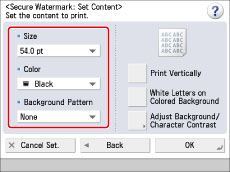
Press the <Size> drop-down list → select the size of the watermark.
Press the <Color> drop-down list → select the colour of the watermark.
Press the <Background Pattern> drop-down list → select a background pattern.
If you do not want to add a background pattern, select [None].
5.
Press [Adjust Background/Character Contrast] → adjust the contrast of the embedded letters and the background pattern.
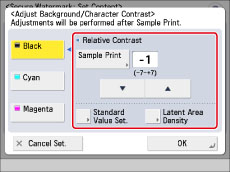
If you do not want to adjust the contrast, proceed to step 7.
|
NOTE
|
|
The [Adjust Background/Character Contrast] setting is cancelled when the job is complete. If you want to use the same settings for the next copy job, specify the setting again.
|
Press [Sample Print] → select the paper source→ press [Start Printing].
|
NOTE
|
|
The sample print includes the hidden text and the background for each relative contrast value.
The area within the frame on the sample print is the output sample for the currently set relative contrast value.
|
Select the colour to adjust → set the optimal relative contrast value using  and
and  .
.
and .Refer to the sample print to adjust the relative contrast value.
If you increase the relative contrast value, the text gets more dense. If you decrease the value, the text gets lighter. When [White Letters on Colored Background] is set, if you increase the relative contrast value, the text gets more dense. If you decrease the value, the text gets lighter.
The setting range for Relative Contrast Value will differ, depending on Standard Value Settings you have set.
|
Standard Value Settings
|
Relative Contrast Value
|
|
1
|
0 to +7
|
|
4
|
-3 to +7
|
|
8 to 56
|
-7 to +7
|
|
60
|
-7 to +4
|
|
64
|
-7 to 0
|
To specify the standard value:
Select the desired colour → press [Standard Value Set.].
Press [Sample Print] → select the paper source→ press [Start Printing].
|
NOTE
|
|
The sample print includes the hidden text and the background for each relative contrast value.
The area within the frame on the sample print is the output sample for the currently set standard value.
|
Press and to adjust the standard value → press [OK].
and to adjust the standard value → press [OK].Refer to the sample print to adjust the standard value.
If you increase the standard value, the text gets denser, and if you decrease the value, the text gets lighter.
To adjust the density of the latent image:
Select the colour for the embedded text → press [Latent Area Density].
Press [-] and [+] to adjust the density of the latent image → press [OK].
If you increase the value for [Latent Area Density], the embedded text gets denser, and if you decrease the value, the text gets lighter.
6.
Press [OK].
7.
Press [OK] → [Close].
|
IMPORTANT
|
|
For information on the modes which cannot be set in combination with this mode, see "Combination of Functions Chart."
You cannot change the copy exposure while copying in the Secure Watermark mode.
Printing performance may not be optimal, depending on the original content and combination of settings.
|