Processing Received Documents
When the machine receives I-fax documents, they are processed as shown below:
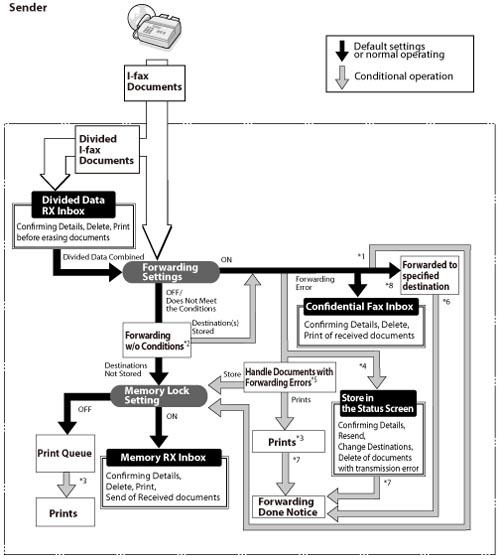
*1 If you set <Store/Print Received File> to 'On' in [Forwarding Settings] in [Common Settings] in [Receive/Forward] in [Function Settings] (Settings/Registration), forwarded documents are either printed or stored in the Memory RX Inbox.
*2 If you set [Forward w/o Conditions] in [Forwarding Settings] in [Common Settings] in [Receive/Forward] in [Function Settings] (Settings/Registration), all received documents that do not match the specified forwarding conditions are forwarded to the selected destination.
*3 If documents are received while paper is jammed, or paper or toner has run out, they are printed after the paper jam is cleared, paper is loaded, or toner is added.
*4 If you set [Delete Failed TX Jobs] to 'Off' in [Forwarding Settings] in [Common Settings] in [Receive/Forward] in [Function Settings] (Settings/Registration), the status of any job with a forwarding error will be saved on the Status Monitor/Cancel screen.
*5 Documents with forwarding errors are handled based on the settings for [Handle Files with Forwarding
Errors] in [Forwarding Settings] in [Common Settings] in [Receive/Forward] in [Function Settings] (Settings/Registration). The settings are as follows:
Errors] in [Forwarding Settings] in [Common Settings] in [Receive/Forward] in [Function Settings] (Settings/Registration). The settings are as follows:
[Always Print]: All documents with forwarding errors are printed.
[Store/Print]: Documents with forwarding errors are stored in the Memory RX Inbox if <Use I-Fax Memory Lock> is turned 'On'. If <Use I-Fax Memory Lock> is turned 'Off', the documents are printed.
*6 If you specify an e-mail address for [Fwd Done Notice] in [Forwarding Settings] in [Common Settings] in [Receive/Forward] in [Function Settings] (Settings/Registration), a notification e-mail is sent when the forwarding job completes successfully.
*7 If you also set [Notice Only for Errors] to 'On' in [Forwarding Settings] in [Common Settings] in [Receive/Forward] in [Function Settings] (Settings/Registration), a notification e-mail is sent only if the document fails to be forwarded.
*8 You can store received I-fax documents in the Confidential Fax Inbox by specifying it as the forwarding destination. Only received documents that match the specified forwarding conditions are stored in the Confidential Fax Inbox.
|
NOTE
|
|
If the memory is full, no additional jobs can be processed.
For information on the following settings, see their respective sections:
Memory RX Inbox, I-Fax Memory Lock, and Confidential Fax Inbox (See "Specifying the Fax/I-Fax Inbox Settings.")
Confidential Fax Inbox and Forwarding Settings (See "Storing Forwarding Settings" and "When Forwarding Destinations Do Not Match the Forwarding Conditions.")
|