2 Pages enables you to copy facing pages in a book or bound original to fit onto separate pages.
Book→2 Pages
Book 2 Pages enables you to copy facing pages in a book or bound original to fit onto separate pages.
2 Pages enables you to copy facing pages in a book or bound original to fit onto separate pages.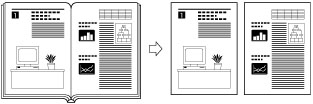
|
IMPORTANT
|
|
Place your original on the platen glass. Book
2 Pages cannot be used when the original is placed in the feeder (DADF-AM1).You cannot select the custom size paper or envelopes as the paper source for Book
2 Pages. |
|
NOTE
|
|
Combine functions:
You can use Book
2 Pages together with the following functions.You can start copying from the left page only.
|
1
Place documents on the platen glass.
To make copies in the correct page order, begin copying from the first facing pages of the book or bound original. Place your original face down, making sure that its top edge is aligned with the back edge of the platen glass (by the arrow in the top left corner).
2
Display the Copy mode screen.
Press [ ] (COPY/SCAN) to switch to the Copy mode screen.
] (COPY/SCAN) to switch to the Copy mode screen.3
Press [ ] or [
 ] to highlight <Book 2 Pages: Off>, and then press [OK].
] or [] to highlight <Book 2 Pages: Off>, and then press [OK].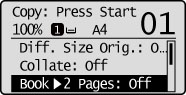
4
Press [] or [] to highlight <On>, and then press [OK].
] or [] to highlight <On>, and then press [OK].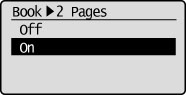
5
Press  (Start).
(Start).6
Set the next document and press [] (Start).
] (Start).Repeat these steps until all documents are scanned.
7
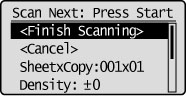
Press [ ] or [] to highlight <Finish Scanning>, and then press [OK].
] or [] to highlight <Finish Scanning>, and then press [OK].